
Triangle Symmedian: Geometric Construction & Properties
Loading the math board and drawing, please wait…
In collections
Besondere Punkte/Special Points
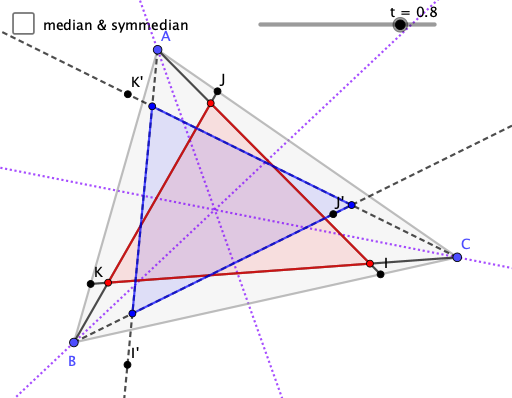
This GeoGebra example demonstrates how the symmedian-related relationships in a triangle remain consistent under a structured dynamic construction. It uses classical constructions—especially angle bisectors and reflections—to visually verify the geometric correspondences associated with symmedians. The key math concepts include triangle geometry construction, midpoints, intersection points that act as hubs for derived lines, and the symmedian’s connection to symmetry/ratio-type properties (often described via reflection and angle-bisector-based setups). Construction workflow (from the provided command summary): build the triangle with Polygon; compute edge midpoints using Midpoint; create and manage sides/segments with Segment; find critical derived points using Intersect; generate the needed internal angle bisectors with AngularBisector; and apply Mirror (reflection) and Ray to establish direction-preserving correspondences and to check the resulting lines. The scene includes multiple auxiliary points (original and mirrored) enabling the symmedian configuration to be observed and tested. Suitable for upper-secondary geometry, contest preparation, and dynamic-geometry teaching where students explore symmedians through interactive construction.
GeoGebra Commands & Parameters
Polygon(A, B, C) → t1, c, a, bMidpoint(a) → DMidpoint(b) → EMidpoint(c) → FSegment(A, D) → fSegment(B, E) → gSegment(C, F) → hIntersect(f, g) → GAngularBisector(B, A, C) → iAngularBisector(A, C, B) → jAngularBisector(C, B, A) → kMirror(B, k) → B'Mirror(E, k) → E'Segment(B', E') → g'Mirror(C, j) → C'Mirror(F, j) → F'Segment(C', F') → h'Mirror(A, i) → A'Mirror(D, i) → D'Segment(A', D') → f'Intersect(f', h') → HSegment(A, I) → lSegment(B, J) → mSegment(C, K) → nIntersect(l, m) → LIntersect(m, n) → MIntersect(l, n) → NPolygon(L, M, N) → t2, n_1, l_1, m_1Mirror(A, i) → A'_{1}Mirror(I, i) → I'Ray(A, I') → l'Mirror(C, j) → C'_{1}Mirror(K, j) → K'Ray(C, K') → n'Mirror(B, k) → B'_{1}Mirror(J, k) → J'Ray(B, J') → m'Intersect(l', m') → OIntersect(m', n') → PIntersect(n', l') → QPolygon(O, P, Q) → t3, q, o, p
AI Drawing Prompt Reference
Draw triangle ABC, then find the midpoints D, E, F of sides AB, BC, CA, and connect AD, BE, CF, which intersect at point G. Next, draw the angle bisectors BI, CI, AI, and their reflections at midpoints E, F, D to form new segments E'F', F'D', D'E'. Finally, use the reflections of I, K, J at the angle bisectors to draw the new triangle OPQ.
The prompt above was compiled from the original drawing commands and is for reference only.