
Properties of a Rhombus by Philip Collett
Loading the math board and drawing, please wait…
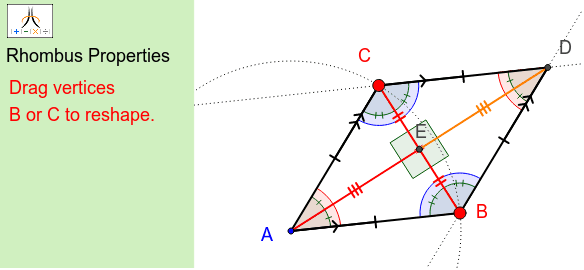
This example demonstrates the properties of a rhombus. Key mathematical concepts include the definition of a rhombus, properties of diagonals, and angle relationships. Using GeoGebra commands such as Circle, Point, Segment, Line, and Intersect, dynamic exploration of the geometric properties of a rhombus is possible. Suitable for middle school and above students or teachers.
GeoGebra Commands & Parameters
Circle(A, B) → cPoint(c) → CSegment(A, C) → aSegment(A, B) → bLine(C, b) → dLine(B, a) → eIntersect(d, e) → DSegment(A, D) → fSegment(C, B) → gSegment(C, D) → hSegment(B, D) → iIntersect(f, g) → ESegment(E, C) → jSegment(E, B) → kSegment(A, E) → lSegment(D, E) → mAngle(B, A, D) → αAngle(D, A, C) → βAngle(g, f) → γAngle(A, E, B) → δAngle(C, E, A) → εAngle(D, E, C) → ζAngle(B, A, C) → ηAngle(C, D, E) → θAngle(E, D, B) → ιAngle(C, D, B) → κAngle(A, C, E) → λAngle(E, C, D) → μAngle(A, C, D) → νAngle(E, B, A) → ξAngle(D, B, E) → οAngle(D, B, A) → ρMidpoint(C, D) → FMidpoint(D, B) → GMidpoint(A, B) → HMidpoint(C, A) → ISegment(C, F) → nSegment(A, H) → pSegment(I, C) → qSegment(G, D) → rCorner(1, 1) → Cnr1Corner(1, 2) → Cnr2Corner(1, 3) → Cnr3Corner(1, 4) → Cnr4Polygon(CN1, CN2, CN3, CN4) → Panel, cn1, cn2, cn3, cn4Polygon(Cnr1, Cnr2, Cnr3, Cnr4) → Frame, cnr1, cnr2, cnr3, cnr4
AI Drawing Prompt Reference
Draw a rhombus by creating a circle with points A and B, taking point C from the circle, connecting AC and AB, drawing lines through C and B that intersect at point D, connecting AD, CD, BD, and BC, finding the midpoints F and G of AC and BD, connecting CF, AG, CI, and GD, and finally drawing a bounding quadrilateral around the rhombus, labeling the angles and midpoints F and G.
The prompt above was compiled from the original drawing commands and is for reference only.