
Open-Middle Trapezoid Area Under Fixed Perimeter (GeoGebra)
Loading the math board and drawing, please wait…
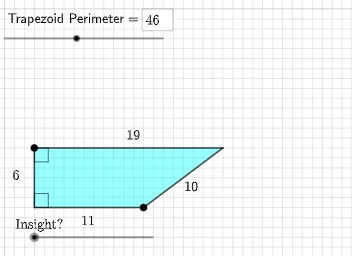
This example demonstrates an “open middle” trapezoid area selection problem: under a fixed perimeter, how the trapezoid’s area can vary as geometric parameters change, and how the admissible configurations can be constructed and compared. It centers on trapezoid geometry with perimeter constraints, relationships between area and geometric invariants, angle measurement (e.g., α, β, γ, δ), midpoint/segmentation constructions, and encoding constraints with a conic (ellipse) to convert the area question into an intersection/parameter construction problem. Construction uses Intersect to obtain key points, Point/Segment/Ray to build edges and rays, Ellipse to represent the locus of configurations satisfying the constraint, Polygon to outline the trapezoid, PointIn and Midpoint for membership and midpoint placement, Rotate and Angle to control orientations and required angles, and SurdText/Textfield for readable parameter and algebraic-style annotations. Suitable for high school advanced geometry, contest preparation, and interactive teaching about constrained optimization by geometric loci.
GeoGebra Commands & Parameters
Intersect(xAxis, yAxis) → APoint(Ray[(0, 1), (0, 2)]) → BSegment(A, B) → hRay(B, B + (1, 0)) → iPoint(Ray[A, A + (1, 0)]) → ESegment(A, E) → jEllipse(B, E, (1 / 2 * (P - h - j))) → eIntersect(e, f) → C, DPolygon(B, D, E, A) → q1, b, d_1, e_1, aPointIn(q1) → Pointq1Midpoint(D, E) → FRotate(B, ((-π) * d), F) → B'Rotate(D, ((-π) * d), F) → D'Rotate(E, ((-π) * d), F) → E'Rotate(A, ((-π) * d), F) → A'Polygon(B', D', E', A') → q1', b', d', e', a'Segment(B, D) → gSegment(D, E) → kSegment(A', B') → lSegment(B', D') → mSegment(D', E') → nSegment(E', A') → pAngle(E', A', B') → αAngle(A', B', D') → βAngle(E, A, B) → γAngle(A, B, D) → δSurdText(g) → text1SurdText(k) → text2SurdText(Distance[D', B']) → text3Textfield(P) → InputBox1
AI Drawing Prompt Reference
On a coordinate plane, draw a horizontal x-axis and a vertical y-axis and take their intersection as a base point. From this base point, define points using upward and rightward ray directions, connect the base point to one of these ray points to form the fixed middle segment. Construct an ellipse whose foci are the two ray points, with its size determined by a constraint based on the perimeter input and the middle segment and adjacent segment lengths. Intersect the ellipse with the relevant locus line(s) to obtain two key points. Use these four core points to form an open-middle trapezoid and outline its sides. Compute the midpoint of the two intersection points and use it as the rotation center to rotate the trapezoid to a second corresponding position by a fixed angle. Finally, measure the characteristic angles (α, β, γ, δ) formed by the trapezoid edges before and after rotation, and include readable text for the main segment lengths and distance.
The prompt above was compiled from the original drawing commands and is for reference only.