
Reading Measuring Cup Scales
Loading the math board and drawing, please wait…
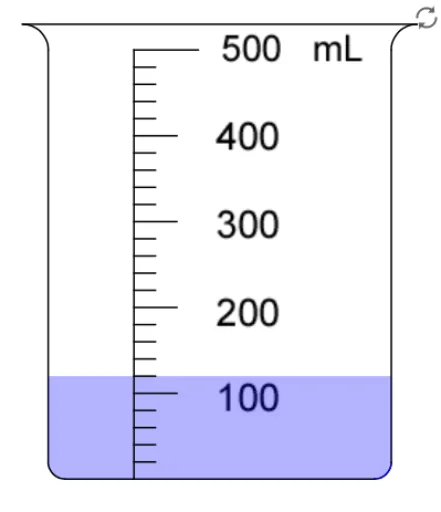
This example demonstrates how to read scales on a measuring cup. Key mathematical concepts include proportions and unit conversion. Using GeoGebra commands such as Segment, CircleArc, and Sequence, the example dynamically shows the changes in measuring cup scales. Suitable for middle school and above students to learn volume measurement.
GeoGebra Commands & Parameters
Segment((-2.3, 5.3), (2.3, 5.3)) → aCircleArc((2.3, 5), (2.3, 5.3), (2, 5)) → dCircleArc((-2.3, 5), (-2, 5), (-2.3, 5.3)) → eSegment((2, 0.2), (2, 5)) → cSegment((-2, 0.2), (-2, 5)) → bCircleArc((1.8, 0.2), (1.8, 0), (2, 0.2)) → fCircleArc((-1.8, 0.2), (-2, 0.2), (-1.8, 0)) → gSegment((-1.8, 0), (1.8, 0)) → hSegment((-1, 0), (-1, 5)) → iSegment((-1, 5), (-0.25, 5)) → jSequence(Segment[(-1, (5 * k / NumMark)), (-0.5 + If[NumMark ≟ 10 ∧ Mod[k, 2] ≟ 0, 0.25, 0], (5 * k / NumMark))], k, 1, NumMark - 1) → list1Polygon((-2, 0.2), (-1.8, 0), (1.8, 0), (2, 0.2), (2, (5 * level / ((NumMark * SubMark)))), (-2, (5 * level / ((NumMark * SubMark))))) → poly1, k, l, m, n, p, qCircleArc((-1.8, 0.2), (-2, 0.2), (-1.8, 0)) → arcLCircleArc((1.8, 0.2), (1.8, 0), (2, 0.2)) → arcRSequence(Sequence[Segment[(-1, (5 * i / NumMark) + (5 * j / ((NumMark * SubMark)))), (-0.75, (5 * i / NumMark) + (5 * j / ((NumMark * SubMark))))], j, 1, 4], i, 0, NumMark - 1) → list2Segment((0, 9.3), (2, 9.3)) → Segment[(0, 9.5), (2, 9)]Segment((-1.5, 5), (0, 5)) → rSegment((0.5, 5), (2, 5)) → sSegment((2.5, 5), (4, 5)) → tSequence(Segment[(i, 5), (i, 5.5)], i, -1.5, 2.5, 2) → list3Sequence(Segment[(i, 5), (i, 5.5)], i, 0, 4.5, 2) → list4Sequence(Segment[(0.5 + (1.5 * i / 10), 5), (0.5 + (1.5 * i / 10), 5.3)], i, 2, 8, 2) → list6Sequence(Segment[(2.5 + (1.5 * i / 4), 5), (2.5 + (1.5 * i / 4), 5.3)], i, 1, 3) → list7Polygon((0.5, 4.5), (0.5, 5.5), (2, 5.5), (2, 4.5)) → poly3, e_1, f_1, g_1, h_1Polygon((2.5, 4.5), (2.5, 5.5), (4, 5.5), (4, 4.5)) → poly4, i_1, j_1, k_1, l_1Polygon((-1.5, 4.5), (-1.5, 5.5), (0, 5.5), (0, 4.5)) → poly2, a_1, b_1, c_1, d_1If(Litre, (level / ((NumMark * SubMark)) * MaxV / 1000), (level / ((NumMark * SubMark)) * MaxV)) → VolIf(Vol ≟ Input, true, false) → correctSequence(Segment[(-1.5 + (1.5 * i / 10), 5), (-1.5 + (1.5 * i / 10), 5.2 + If[i ≟ 5, 0.1, 0])], i, 1, 9) → list8Sequence(Segment[(-1.5 + (1.5 * i / 10), 5), (-1.5 + (1.5 * i / 10), 5.25 + If[i ≟ 5, 0.15, 0])], i, 1, 9) → list5Text("1000 mL") → text1000mLText("750") → text750Text("500") → text500Text("250") → text250Text("400") → text2L400Text("800") → text2L800Text("1200") → text2L1200Text("1600") → text2L1600Text("2000 mL") → text2000mLText("1L 600mL") → text1L600mLText("1L 200mL") → text1L200mLText("400mL") → text2L400mLText("800mL") → text2L800mLText(("800" * If[Litre, "mL", ""])) → text800Text(("600" * If[Litre, "mL", ""])) → text600Text(("400" * If[Litre, "mL", ""])) → text400Text(("200" * If[Litre, "mL", ""])) → text200Text(("500" * If[Litre, "mL", ""])) → text2L500Text(If[eng, "L", "升"]) → textLText(If[Vol_{mL} ≥ 1000 ∧ Litre, ((((Div[Vol_{mL}, 1000] * " ") * textL) * " ") * If[Mod[Vol_{mL}, 1000] > 0, ((Mod[Vol_{mL}, 1000] * " ") * textmL), ""]), ((Vol_{mL} * " ") * textmL)]) → text4Point(y = y(I)) → JSegment(I, J) → m_1Text(If[eng, "4 Marks", "4 個刻度"], (2.6, 4.6)) → text8Text(If[eng, "5 Marks", "5 個刻度"], (0.6, 4.6)) → text7Text(If[eng, "10 Marks", "10 個刻度"], (-1.5, 4.6)) → text3