
Random Mixed Numbers: Exploring the Intersection of Geometry and Probability
Loading the math board and drawing, please wait…
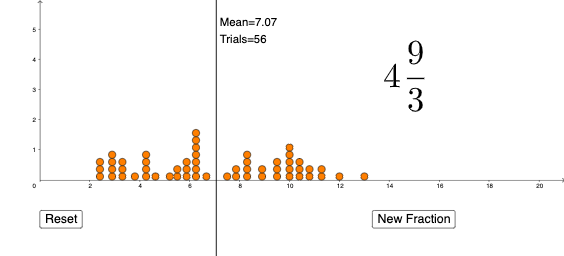
This example demonstrates the distribution of random mixed numbers in geometric figures. The key mathematical concepts involved include random experiments, geometric mean, and the generation of random sequences. Construction involves using GeoGebra commands such as Sequence, RandomElement, and DotPlot to generate random points and calculate the median. Suitable for middle school or high school students to understand the integration of probability and geometry, and to apply random number generation techniques in mathematical experiments.
GeoGebra Commands & Parameters
Sequence(a, a, 2, 10) → NumbersRandomElement(Numbers) → aRandomElement(Numbers) → bRandomElement(Numbers) → cDotPlot(D, true) → l1mean(D) → e
AI Drawing Prompt Reference
Create a geometry-and-probability demonstration. First, form a candidate list of equally spaced numbers from 2 to 10 with step 2. Randomly select three values from this list to serve as a, b, and c. Then plot these selections as a discrete dot distribution on a coordinate plane using a dot plot style. Finally, compute the mean of the plotted points and mark the resulting center value e to visualize the distribution’s central tendency. Emphasize the connection between random sampling and the resulting point pattern.
The prompt above was compiled from the original drawing commands and is for reference only.