
Random Force System
Loading the math board and drawing, please wait…
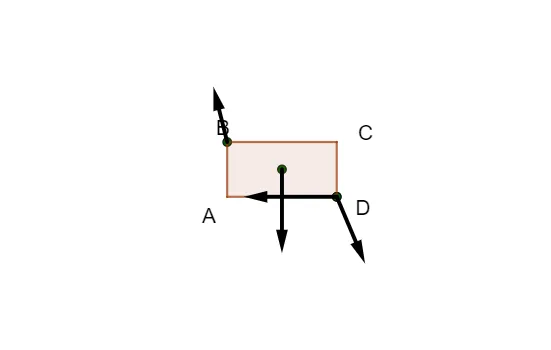
This example demonstrates the geometric representation of a random force system. It involves concepts of vectors and forces. Using GeoGebra commands such as Polygon, Shuffle, Sequence, etc., it dynamically shows the synthesis and decomposition of forces. Suitable for high school physics and mathematics education.
GeoGebra Commands & Parameters
Polygon((0, 0), (2, 0), (2, 1), (0, 1)) → q1, f, g, h, iShuffle({0°, 90°, 180°, 270°, Random[0, 360]°, Random[0, 360]°}) → l2, {180*°, 293*°, 270*°, 104*°, 0*°, 90*°}Sequence(RandomElement[l1], i, 1, 4) → l4Sequence(random() + 1, i, 1, 4) → lengthsSequence(Vector[Element[l4, i], Element[l4, i] + (Element[lengths, i] * (cos(Element[l2, i]), sin(Element[l2, i])))], i, 1, 5) → l3Sequence(Line[Element[l4, i], Element[l4, i] + (Element[lengths, i] * (cos(Element[l2, i]), sin(Element[l2, i])))], i, 1, 5) → l5Corner(2) → Export_1
AI Drawing Prompt Reference
Draw a random force system diagram: start with a rectangle as a reference plane. Randomly select four points inside the rectangle as force application points. For each point, generate a random length and a random direction (chosen from a set of preset angles), then draw an arrowed vector from the point with that length and direction to represent the force. Additionally, draw thin lines extending along each vector to show the line of action. The result shows multiple randomly distributed force vectors, illustrating the geometric synthesis and decomposition of forces.
The prompt above was compiled from the original drawing commands and is for reference only.