
Quiz: Writing Rational Functions (Transformations Included)
Loading the math board and drawing, please wait…
In collections
Rational Functions
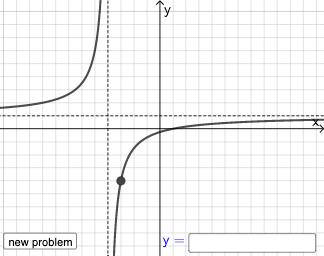
This example demonstrates how to write rational functions through transformations. It involves core math concepts like rational functions, function transformations, and analytical geometry. Construction highlights include commands/objects like Point, Line, Vector, Polygon, Segment, RandomElement, Random, If, Textfield. Suitable for high school mathematics teaching, focusing on practice in writing rational functions and their transformations.
GeoGebra Commands & Parameters
Point(Segment[(h + 1, y(C) + 10), (h + 1, y(C) - 10)]) → DLine(A, B) → fVector(A, C) → uPolygon(A, C, B) → t1, b, a_1, cSegment(A, C) → h_{1}Vector(C, D) → vVector((h, 0), A) → wVector((0, 0), (h, 0)) → jRandomElement({-5, -4, -3, -2, -1, 1, 2, 3, 4, 5}) → nRandom(-8, 8) → oRandom(-8, 8) → pIf(h ≟ o, "Horizontal shift is correct!", "Horizontal shift is not correct.") → text9If(n ≟ rise, "Vertical stretch is correct!", "Vertical stretch is not correct.") → text10If(p ≟ y(A), "Vertical shift is correct!", "Vertical shift is not correct.") → text11Textfield(s) → InputBox1
AI Drawing Prompt Reference
Construct an instructional analytic-geometry diagram for practicing rational-function transformations. Start by selecting two points that depend on a horizontal parameter and place them vertically symmetric about a baseline, then define a reference line passing through the corresponding points. Create direction vectors from the main base point toward another key point to encode the transformation directions. Use these points and vectors to form a polygonal region together with key segments that illustrate both the original and transformed relationships. Choose a random integer parameter from a specified small set, and also pick two random real values to represent the horizontal and vertical transformation quantities. Finally, add a text input box and several short feedback messages near the diagram to indicate whether the horizontal shift, vertical stretch, and vertical shift match the intended targets.
The prompt above was compiled from the original drawing commands and is for reference only.