
Quiz: Graphing Exponential Functions
Loading the math board and drawing, please wait…
In collections
Exponential & Logarithmic Functions
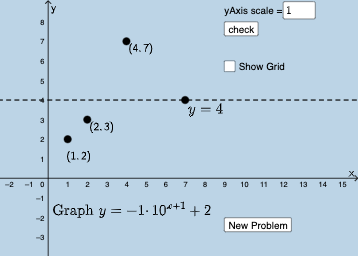
This interactive GeoGebra example is a quiz designed to test understanding of exponential function graphs. It randomly generates parameters for an exponential function, displays its graph, and asks the user to input the correct function expression or parameter values, providing immediate feedback. The core mathematical concepts include the general form f(x)=a·b^(x-h)+k, the roles of base b and coefficient a in growth or decay, and the effects of horizontal shift h and vertical shift k on the graph's position. The construction uses GeoGebra commands such as RandomElement to select a random base from a list, FitGrowth to fit an exponential growth curve, SurdText for radical text display, If for conditional logic, along with Textfield and InputBox for user input, and button elements for interaction. Key objects include baselist, a, f, h, k, c1, c2, and various text labels that manage the graph and feedback. This resource is suitable for high school or early college students learning exponential functions, and serves as both a classroom demonstration tool and a self-paced practice quiz to reinforce visual understanding of how parameters transform exponential graphs.
GeoGebra Commands & Parameters
RandomElement(baselist) → aTextfield(xscl) → InputBox1Textfield(yscl) → InputBox2RandomElement({-5, -4, -3, -2, -1, 0, 1, 2, 3, 4, 5}) → hRandomElement({-5, -4, -3, -2, -1, 0, 1, 2, 3, 4, 5}) → kRandomElement({1, 2, -1, -2}) → cFitGrowth({B, C, D}) → pSurdText(D) → text2SurdText(B) → text3SurdText(C) → text4SurdText(y(A)) → text5If(c1, "All points are correct!", "At least one point is incorrect.") → text8If(c2, "Asymptote is correct!", "Asymptote is not correct.") → text7
AI Drawing Prompt Reference
Draw an exponential function graph with a base randomly selected from 1, 2, -1, -2, and horizontal and vertical shifts randomly chosen from -5 to 5. Display the function expression and ask the user to input the correct expression or parameter values. Provide feedback on whether the input is correct.
The prompt above was compiled from the original drawing commands and is for reference only.