
Quiz: Graphically Modeling Exponential Growth & Decay
Loading the math board and drawing, please wait…
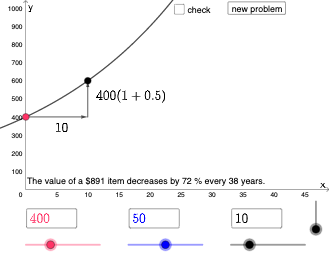
This GeoGebra interactive quiz demonstrates the graphical characteristics of exponential growth and decay. Core mathematical concepts include the visual patterns of exponential functions, the meaning of growth and decay rates, and the relationship between percentages and logarithms. Construction highlights: If conditionals generate random parameters, InputBox elements collect user answers, Textfield displays questions and feedback, Random command creates random values, and Vector is used for plotting function graphs. This example is suitable for middle and high school mathematics courses on exponential functions, helping students intuitively understand exponential growth and decay patterns and master graphical analysis methods.
GeoGebra Commands & Parameters
If(b ≟ 1, (a * (1 + p / 100)^(x / n)), b ≟ 2, (a * (1 - p / 100)^(x / n))) → fTextfield(a) → InputBox2Textfield(n) → InputBox3Textfield(p) → InputBox4If(b ≟ 1, (n, (a * (1 + p / 100))), (n, (a * (1 - p / 100)))) → BVector(C, B) → uVector(A, C) → vIf(b ≟ 1, "increases", "decreases") → text7Random(100, 1000) → gRandom(1, 100) → hRandom(1, 40) → iRandom(1, 2) → jIf(j ≟ 1, "increases", "decreases") → text8If(j ≟ 1, (g * (1 + h / 100)^(x / i)), (g * (1 - h / 100)^(x / i))) → q
AI Drawing Prompt Reference
Draw an exponential growth and decay function with initial value a, time unit n, and percentage change rate p. Use randomly generated parameters g, h, and i to dynamically change the function. The function represents growth or decay based on the value of b. Use vectors u and v to plot the function and display the growth or decay text on the graph.
The prompt above was compiled from the original drawing commands and is for reference only.