
Quick Locus Exploration: Parabola Trajectory
Loading the math board and drawing, please wait…
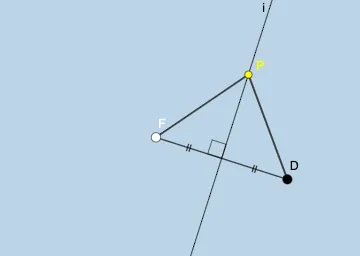
This example demonstrates the exploration of parabola trajectories, involving mathematical concepts such as geometric construction, parametric equations, and similar triangles. The construction uses GeoGebra commands like Line, Parabola, OrthogonalLine, and Intersect with objects such as A, B, f, F, and c. Suitable for high school students or math enthusiasts learning geometry and graphing functions.
GeoGebra Commands & Parameters
Line(A, B) → fParabola(F, f) → cPoint(f) → DOrthogonalLine(D, f) → gIntersect(c, g, 1) → PAngle(g, f) → αSegment(F, D) → hLineBisector(h) → iIntersect(i, h) → F_{1}Segment(F, F_{1}) → jSegment(F_{1}, D) → kAngle(F, F_{1}, P) → γSegment(P, D) → lSegment(F, P) → m
AI Drawing Prompt Reference
Draw a line f through two points A and B. Create a parabola c with point F as the focus and line f as the directrix. Take a point D on the directrix f, then draw a perpendicular line g through D to intersect the parabola at point P. Construct segment h connecting the focus F and point D, then find its midpoint F1 by drawing the perpendicular bisector i. Connect F to F1 and F1 to D with segments j and k. Mark the angle at F1 formed by points F, F1, and P as γ, and draw the segments connecting P to D and F to P.
The prompt above was compiled from the original drawing commands and is for reference only.