
Quadrilaterals and Diagonals
Loading the math board and drawing, please wait…
In collections
Y7 Polygons
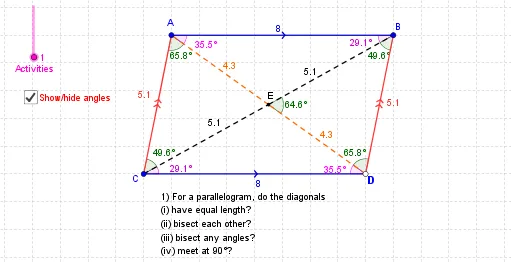
This example demonstrates the geometric properties of quadrilaterals and their diagonals. It involves core math concepts like polygons, diagonals, angles, distances, and geometric construction. The construction uses commands/objects such as Line, Segment, Intersect, Distance, Circle, Point, OrthogonalLine, Mirror, Angle, and Midpoint in GeoGebra. Suitable for high school students and teachers learning geometric constructions.
GeoGebra Commands & Parameters
Line(A, B) → aLine(C, a) → bSegment(C, A) → cLine(B, c) → dSegment(A, B) → eIntersect(b, d) → DSegment(C, D) → fSegment(D, B) → gDistance(A, B) → distanceABSegment(C, B) → iSegment(A, D) → jIntersect(i, j) → ECircle(G, F) → kSegment(G, F) → lPoint(k) → HSegment(G, H) → mLine(H, l) → nLine(F, m) → pIntersect(n, p) → ISegment(H, I) → qSegment(F, I) → rSegment(G, I) → sSegment(H, F) → tIntersect(s, t) → JSegment(K, L) → a_1OrthogonalLine(L, a_1) → b_1Point(b_1) → MOrthogonalLine(M, b_1) → c_1OrthogonalLine(K, a_1) → d_1Intersect(c_1, d_1) → NSegment(L, M) → e_1Segment(K, N) → g_1Segment(N, M) → f_1Segment(K, M) → h_1Segment(L, N) → i_1Intersect(h_1, i_1) → OCircle(P, Q) → k_1Segment(P, Q) → j_1OrthogonalLine(P, j_1) → l_1OrthogonalLine(Q, j_1) → m_1Intersect(k_1, l_1, 2) → SLine(S, j_1) → n_1Intersect(m_1, n_1) → RSegment(P, S) → p_1Segment(S, R) → q_1Segment(P, R) → s_1Segment(Q, S) → t_1Intersect(s_1, t_1) → TSegment(Q, R) → r_1Segment(W, U) → a_2Segment(U, V) → b_2Segment(V, W) → c_2Mirror(V, a_2) → XSegment(W, X) → d_2Segment(X, U) → e_2Segment(V, X) → f_2Intersect(a_2, f_2) → ZSegment(A_1, B_1) → g_2Segment(A_1, C_1) → h_2Line(C_1, g_2) → i_2Point(i_2) → D_1Segment(B_1, D_1) → j_2Segment(C_1, D_1) → k_2Segment(C_1, B_1) → l_2Segment(A_1, D_1) → m_2Intersect(l_2, m_2) → E_1Segment(C, E) → n_2Segment(E, B) → p_2Segment(D, E) → q_2Segment(E, A) → r_2Angle(A, B, E) → αAngle(E, B, D) → βAngle(B, D, E) → γAngle(E, D, C) → δAngle(D, C, E) → β_1Angle(E, C, A) → γ_1Angle(C, A, E) → δ_1Angle(E, A, B) → ε_1Angle(D, E, B) → ζ_1Segment(G, J) → s_2Segment(J, I) → t_2Segment(F, J) → a_3Segment(J, H) → b_3Angle(J, H, I) → εAngle(H, I, J) → ζAngle(J, I, F) → ηAngle(I, F, J) → θAngle(J, F, G) → η_1Angle(F, G, J) → θ_1Angle(J, G, H) → ι_1Angle(G, H, J) → κ_1Angle(I, J, H) → λ_1Segment(K, O) → c_3Segment(O, M) → d_3Segment(L, O) → e_3Segment(O, N) → f_3Angle(L, M, O) → ιAngle(O, M, N) → κAngle(M, N, O) → λAngle(O, N, K) → μAngle(N, K, O) → μ_1Angle(O, K, L) → ν_1Angle(K, L, O) → ξ_1Angle(O, L, M) → ο_1Angle(K, O, N) → ρ_1Segment(S, T) → g_3Segment(T, Q) → h_3Segment(P, T) → i_3Segment(T, R) → j_3Angle(T, S, R) → νAngle(S, R, T) → ξAngle(T, R, Q) → οAngle(R, Q, T) → ρAngle(T, Q, P) → σ_1Angle(Q, P, T) → τ_1Angle(T, P, S) → υ_1Angle(P, S, T) → φ_1Angle(Q, T, R) → χ_1Angle(X, Z, W) → σAngle(U, W, X) → τAngle(W, X, V) → υAngle(V, X, U) → φAngle(X, U, W) → ψ_1Angle(W, U, V) → ω_1Angle(U, V, X) → α_2Angle(X, V, W) → β_2Angle(V, W, U) → γ_2Segment(W, U) → k_3Segment(V, X) → l_3Midpoint(V, Z) → F_1Midpoint(Z, X) → G_1Distance(V, Z) → distanceVZDistance(V, Z) → oDistance(W, Z) → uDistance(U, Z) → vMidpoint(Z, W) → H_1Midpoint(U, Z) → I_1Segment(C_1, E_1) → m_3Segment(E_1, B_1) → n_3Segment(E_1, D_1) → p_3Segment(E_1, A_1) → q_3Angle(E_1, A_1, B_1) → χAngle(A_1, B_1, E_1) → ψAngle(E_1, B_1, D_1) → ωAngle(B_1, D_1, E_1) → α_1Angle(E_1, D_1, C_1) → δ_2Angle(D_1, C_1, E_1) → ε_2Angle(E_1, C_1, A_1) → ζ_2Angle(C_1, A_1, E_1) → η_2
AI Drawing Prompt Reference
Draw a quadrilateral ABCD and connect its diagonals AC and BD, marking their intersection as E. Then draw circles with E as the center and A, B, C, D on the circumference, marking the intersection points as F. Next, draw quadrilateral AEDF and connect its diagonals AF and DE, marking their intersection as G. Finally, draw quadrilateral AEGF and connect its diagonals AG and EF, marking their intersection as H.
The prompt above was compiled from the original drawing commands and is for reference only.