
Quadrilateral Tesselation via Midpoint Rotation
Loading the math board and drawing, please wait…
In collections
Tessellations of Common Figures
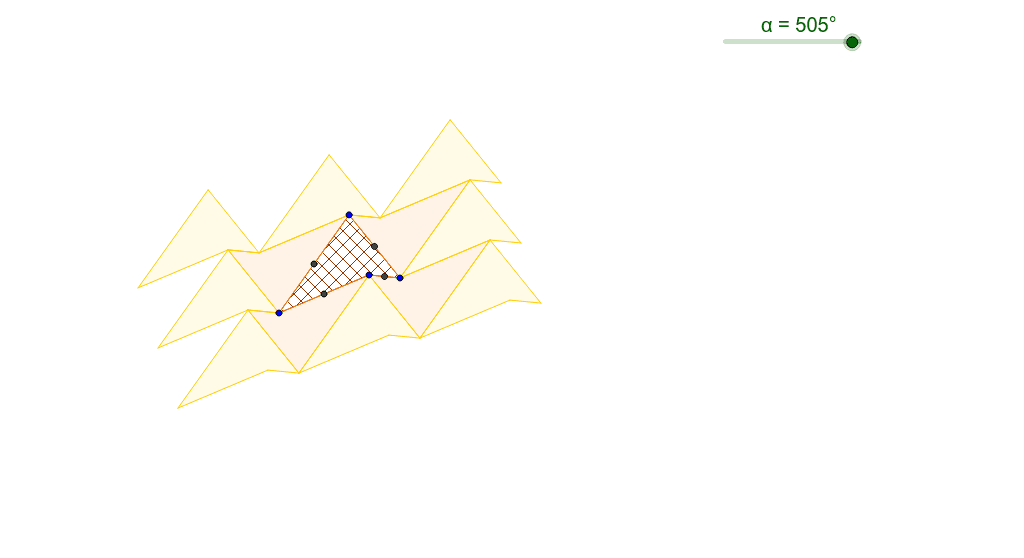
This example demonstrates how quadrilaterals can tessellate through rotation about the midpoints of their sides. Key concepts include rotation, geometric transformations, and tiling. GeoGebra commands used include Polygon, Midpoint, and Rotate. Suitable for middle school and above students learning about geometric transformations and tiling patterns.
GeoGebra Commands & Parameters
Max(Min[α, 180*°], 0*°) → ang1Min(Max[α - 180°, 0*°], 180*°) → ang2Polygon(A, B, C, D) → poly1, a, b, c, dMidpoint(d) → EMidpoint(a) → FMidpoint(b) → GMidpoint(c) → HRotate(A, ang1, E) → A'Rotate(B, ang1, E) → B'Rotate(C, ang1, E) → C'Rotate(D, ang1, E) → D'Polygon(A', B', C', D') → poly1', a', b', c', d'Rotate(A, ang1, F) → A'_1Rotate(B, ang1, F) → B'_1Rotate(C, ang1, F) → C'_1Rotate(D, ang1, F) → D'_1Polygon(A'_1, B'_1, C'_1, D'_1) → poly1'_1, a'_1, b'_1, c'_1, d'_1Rotate(A, ang1, G) → A'_2Rotate(B, ang1, G) → B'_2Rotate(C, ang1, G) → C'_2Rotate(D, ang1, G) → D'_2Polygon(A'_2, B'_2, C'_2, D'_2) → poly1'_2, a'_2, b'_2, c'_2, d'_2Rotate(A, ang1, H) → A'_3Rotate(B, ang1, H) → B'_3Rotate(C, ang1, H) → C'_3Rotate(D, ang1, H) → D'_3Polygon(A'_3, B'_3, C'_3, D'_3) → poly1'_3, a'_3, b'_3, c'_3, d'_3Midpoint(c'_1) → IMidpoint(c'_2) → LMidpoint(a'_2) → JMidpoint(a'_3) → KMidpoint(a') → MMidpoint(c') → NMidpoint(d'_2) → OMidpoint(b') → PRotate(A'_1, ang2, I) → QRotate(B'_1, ang2, I) → RRotate(C'_1, ang2, I) → SRotate(D'_1, ang2, I) → TPolygon(Q, R, S, T) → poly2, q, r, s, tRotate(A', ang2, N) → A''Rotate(B', ang2, N) → B''Rotate(C', ang2, N) → C''Rotate(D', ang2, N) → D''Polygon(A'', B'', C'', D'') → poly1'', a'', b'', c'', d''Rotate(A', ang2, P) → A''_1Rotate(B', ang2, P) → B''_1Rotate(C', ang2, P) → C''_1Rotate(D', ang2, P) → D''_1Polygon(A''_1, B''_1, C''_1, D''_1) → poly1''_1, a''_1, b''_1, c''_1, d''_1Rotate(A', ang2, M) → A''_2Rotate(B', ang2, M) → B''_2Rotate(C', ang2, M) → C''_2Rotate(D', ang2, M) → D''_2Polygon(A''_2, B''_2, C''_2, D''_2) → poly1''_2, a''_2, b''_2, c''_2, d''_2Rotate(A'_2, ang2, L) → URotate(B'_2, ang2, L) → VRotate(C'_2, ang2, L) → WRotate(D'_2, ang2, L) → ZPolygon(U, V, W, Z) → poly3, u, v, w, zRotate(A'_2, ang2, O) → A_1Rotate(B'_2, ang2, O) → B_1Rotate(C'_2, ang2, O) → C_1Rotate(D'_2, ang2, O) → D_1Polygon(A_1, B_1, C_1, D_1) → poly4, a_1, b_1, c_1, d_1Rotate(A'_2, ang2, J) → E_1Rotate(B'_2, ang2, J) → F_1Rotate(C'_2, ang2, J) → G_1Rotate(D'_2, ang2, J) → H_1Polygon(E_1, F_1, G_1, H_1) → poly5, e_1, f_1, g_1, h_1Rotate(A'_3, ang2, K) → I_1Rotate(B'_3, ang2, K) → J_1Rotate(C'_3, ang2, K) → K_1Rotate(D'_3, ang2, K) → L_1Polygon(I_1, J_1, K_1, L_1) → poly6, i_1, j_1, k_1, l_1
AI Drawing Prompt Reference
Draw a quadrilateral and then rotate it around the midpoints of its sides to create a repeating quadrilateral pattern. First, draw a quadrilateral, then find the midpoints of its sides, and rotate the quadrilateral around these midpoints by a specific angle to generate new quadrilaterals. Repeat this process multiple times to form a repeating quadrilateral pattern.
The prompt above was compiled from the original drawing commands and is for reference only.