
Can a Regular Pentagon Tessellate?
Loading the math board and drawing, please wait…
In collections
Tessellations of Common Figures
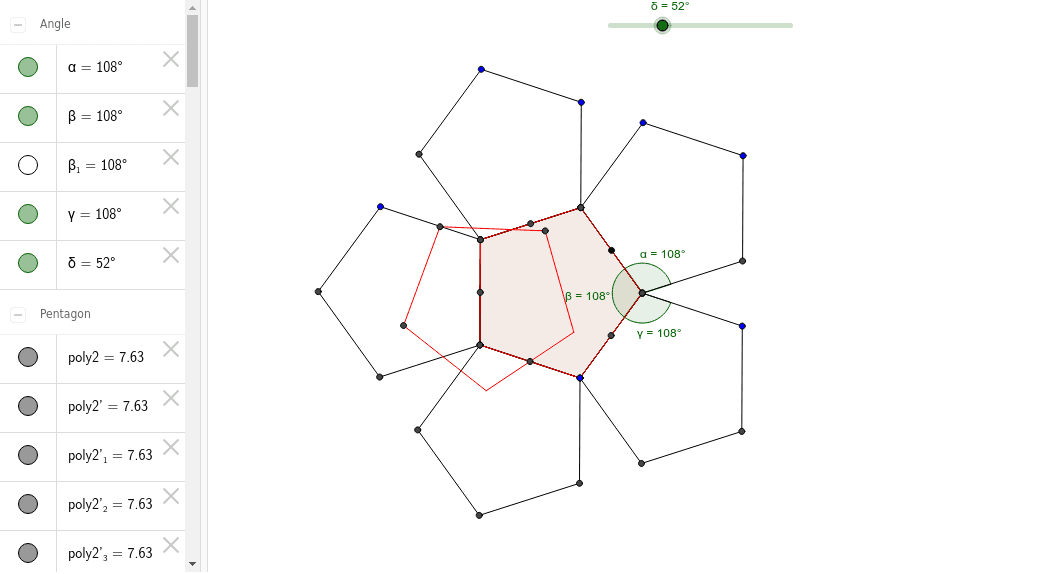
This example demonstrates attempting to tessellate a regular pentagon using the mid-side tessellation rule, which works for triangles, quadrilaterals, and hexagons. It involves core math concepts like polygon construction, midpoints, rotation, and angles. The construction uses GeoGebra commands such as Polygon, Midpoint, Rotate, and Angle. Suitable for middle school students and math enthusiasts learning about geometric transformations and tiling theories.
GeoGebra Commands & Parameters
Polygon(A, B, 5) → poly1, a, b, c, d, e, C, D, EMidpoint(A, B) → FMidpoint(B, C) → GMidpoint(D, C) → HMidpoint(D, E) → IMidpoint(E, A) → JPolygon(A, B, C, D, E) → poly2, a_1, b_1, c_1, d_1, e_1Rotate(A, 180*°, I) → A'Rotate(B, 180*°, I) → B'Rotate(C, 180*°, I) → C'Rotate(D, 180*°, I) → D'Rotate(E, 180*°, I) → E'Polygon(A', B', C', D', E') → poly2', a', b', c', d', e'Rotate(A, 180*°, H) → A'_1Rotate(B, 180*°, H) → B'_1Rotate(C, 180*°, H) → C'_1Rotate(D, 180*°, H) → D'_1Rotate(E, 180*°, H) → E'_1Polygon(A'_1, B'_1, C'_1, D'_1, E'_1) → poly2'_1, a'_1, b'_1, c'_1, d'_1, e'_1Rotate(A, 180*°, G) → A'_2Rotate(B, 180*°, G) → B'_2Rotate(C, 180*°, G) → C'_2Rotate(D, 180*°, G) → D'_2Rotate(E, 180*°, G) → E'_2Polygon(A'_2, B'_2, C'_2, D'_2, E'_2) → poly2'_2, a'_2, b'_2, c'_2, d'_2, e'_2Rotate(A, 180*°, F) → A'_3Rotate(B, 180*°, F) → B'_3Rotate(C, 180*°, F) → C'_3Rotate(D, 180*°, F) → D'_3Rotate(E, 180*°, F) → E'_3Polygon(A'_3, B'_3, C'_3, D'_3, E'_3) → poly2'_3, a'_3, b'_3, c'_3, d'_3, e'_3Rotate(A, 180*°, J) → A'_4Rotate(B, 180*°, J) → B'_4Rotate(C, 180*°, J) → C'_4Rotate(D, 180*°, J) → D'_4Rotate(E, 180*°, J) → E'_4Polygon(A'_4, B'_4, C'_4, D'_4, E'_4) → poly2'_4, a'_4, b'_4, c'_4, d'_4, e'_4Angle(d'_1, c) → αAngle(D, C, B) → βAngle(B, C, A'_2) → γPolygon(A_1, B_1, 5) → poly1_1, a_3, b_3, c_3, d_3, e_3, C_1, D_1, E_1Midpoint(A_1, B_1) → F_1Midpoint(B_1, C_1) → G_1Midpoint(D_1, C_1) → H_1Midpoint(D_1, E_1) → I_1Midpoint(E_1, A_1) → J_1Polygon(A_1, B_1, C_1, D_1, E_1) → poly2_1, a_2, b_2, c_2, d_2, e_2Angle(D_1, C_1, B_1) → β_1Rotate(A_1, δ, F) → KRotate(B_1, δ, F) → LRotate(C_1, δ, F) → MRotate(D_1, δ, F) → NRotate(E_1, δ, F) → OPolygon(K, L, M, N, O) → poly3, k, l, m, n, o
AI Drawing Prompt Reference
Draw a regular pentagon and rotate it and its midpoints around the center point to generate a series of new pentagons. Observe if these pentagons can tessellate the plane without gaps. First, draw a regular pentagon, then find the midpoints of each side, and rotate the pentagon and its sides around these midpoints. Repeat this process multiple times, and finally measure the angle changes of the rotated pentagons.
The prompt above was compiled from the original drawing commands and is for reference only.