
Do Triangles Tessellate? Exploring Midpoint Rotation
Loading the math board and drawing, please wait…
In collections
Tessellations of Common Figures
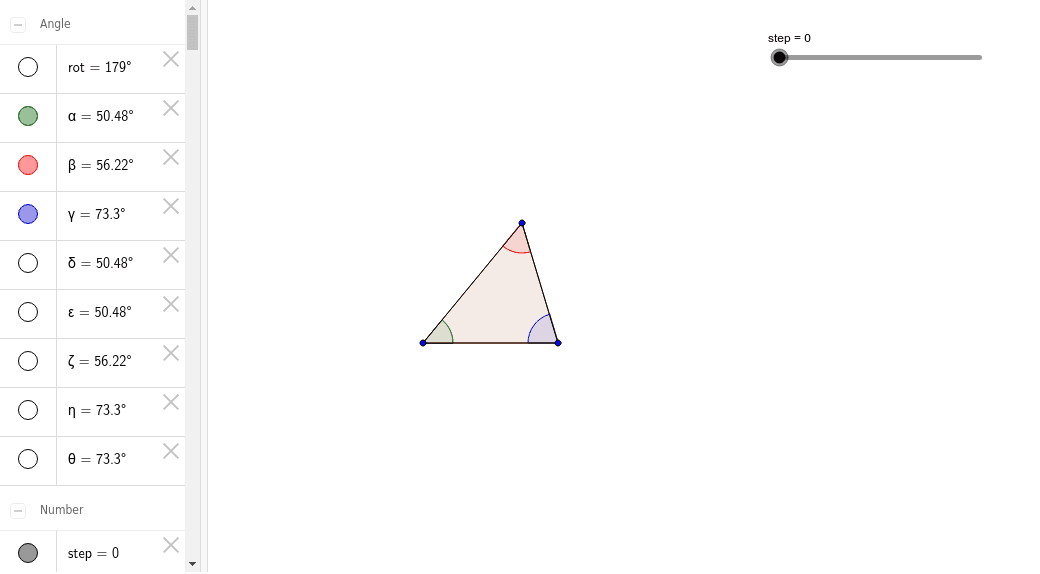
① This animation demonstrates whether any triangle can tessellate the plane using the midpoint rotation rule (one of the 17 wallpaper groups), visually showing how triangles cover the plane without gaps or overlaps. ② Core mathematical concepts include plane tessellation, rotational symmetry, midpoint rotation, wallpaper groups, and the fact that the sum of triangle angles is 180°. ③ Construction highlights: using GeoGebra commands Polygon to create triangle poly1, Midpoint to find side midpoints, and Rotate to rotate the triangle about these midpoints by specified angles, generating multiple rotated copies (e.g., A', B', C') and repeating to form a tessellation pattern; objects include points A, B, C, sides a, b, c, and successive rotated triangles. ④ Suitable for middle/high school geometry or enrichment classes, helping students understand tessellation conditions and transformation geometry, and useful for exploratory learning or teacher demonstrations.
GeoGebra Commands & Parameters
Polygon(A, B, C) → poly1, c, a, bMidpoint(B, C) → DMidpoint(C, A) → EMidpoint(A, B) → FRotate(A, rot, F) → A'Rotate(B, rot, F) → B'Rotate(C, rot, F) → C'Polygon(A', B', C') → poly1', c', a', b'Rotate(A, rot, D) → A'_1Rotate(B, rot, D) → B'_1Rotate(C, rot, D) → C'_1Polygon(A'_1, B'_1, C'_1) → poly1'_1, c'_1, a'_1, b'_1Rotate(A, rot, E) → A'_2Rotate(B, rot, E) → B'_2Rotate(C, rot, E) → C'_2Polygon(A'_2, B'_2, C'_2) → poly1'_2, c'_2, a'_2, b'_2Rotate(A, 180*°, F) → A'_3Rotate(B, 180*°, F) → B'_3Rotate(C, 180*°, F) → C'_3Polygon(A'_3, B'_3, C'_3) → poly1'_3, c'_3, a'_3, b'_3Rotate(A, 180*°, D) → A'_4Rotate(B, 180*°, D) → B'_4Rotate(C, 180*°, D) → C'_4Polygon(A'_4, B'_4, C'_4) → poly1'_4, c'_4, a'_4, b'_4Rotate(A, 180*°, E) → A'_5Rotate(B, 180*°, E) → B'_5Rotate(C, 180*°, E) → C'_5Polygon(A'_5, B'_5, C'_5) → poly1'_5, c'_5, a'_5, b'_5Midpoint(C'_3, B) → GMidpoint(B, A'_4) → HMidpoint(A'_4, C) → IMidpoint(C, B'_5) → JMidpoint(B'_5, A) → KMidpoint(C'_3, A) → LRotate(A'_3, rot, G) → MRotate(B'_3, rot, G) → NRotate(C'_3, rot, G) → OPolygon(M, N, O) → poly2, o, m, nRotate(A'_3, rot, L) → PRotate(B'_3, rot, L) → QRotate(C'_3, rot, L) → RPolygon(P, Q, R) → poly3, r, p, qRotate(A'_4, rot, H) → SRotate(B'_4, rot, H) → TRotate(C'_4, rot, H) → UPolygon(S, T, U) → poly4, u, s, tRotate(A'_4, rot, I) → VRotate(B'_4, rot, I) → WRotate(C'_4, rot, I) → ZPolygon(V, W, Z) → poly5, z, v, wRotate(A'_5, rot, K) → A_1Rotate(B'_5, rot, K) → B_1Rotate(C'_5, rot, K) → C_1Polygon(A_1, B_1, C_1) → poly6, c_1, a_1, b_1Rotate(A'_5, rot, J) → D_1Rotate(B'_5, rot, J) → E_1Rotate(C'_5, rot, J) → F_1Polygon(D_1, E_1, F_1) → poly7, f_1, d_1, e_1Angle(C, A, B) → αAngle(A, B, C) → βAngle(B, C, A) → γMidpoint(a'_3) → G_1Midpoint(b'_3) → H_1Midpoint(b'_4) → I_1Midpoint(c'_4) → J_1Midpoint(c'_5) → K_1Midpoint(a'_5) → L_1Rotate(A'_3, 180*°, H_1) → M_1Rotate(B'_3, 180*°, H_1) → N_1Rotate(C'_3, 180*°, H_1) → O_1Polygon(M_1, N_1, O_1) → poly8, o_1, m_1, n_1Rotate(A'_4, 180*°, I_1) → P_1Rotate(B'_4, 180*°, I_1) → Q_1Rotate(C'_4, 180*°, I_1) → R_1Polygon(P_1, Q_1, R_1) → poly9, r_1, p_1, q_1Rotate(A'_4, 180*°, J_1) → S_1Rotate(B'_4, 180*°, J_1) → T_1Rotate(C'_4, 180*°, J_1) → U_1Polygon(S_1, T_1, U_1) → poly10, u_1, s_1, t_1Rotate(A'_5, 180*°, K_1) → V_1Rotate(B'_5, 180*°, K_1) → W_1Rotate(C'_5, 180*°, K_1) → Z_1Polygon(V_1, W_1, Z_1) → poly11, z_1, v_1, w_1Rotate(A'_5, 180*°, L_1) → A_2Rotate(B'_5, 180*°, L_1) → B_2Rotate(C'_5, 180*°, L_1) → C_2Polygon(A_2, B_2, C_2) → poly12, c_2, a_2, b_2Rotate(A'_3, 180*°, G_1) → D_2Rotate(B'_3, 180*°, G_1) → E_2Rotate(C'_3, 180*°, G_1) → F_2Polygon(D_2, E_2, F_2) → poly13, f_2, d_2, e_2Midpoint(t_1) → G_2Midpoint(r_1) → H_2Rotate(P_1, 180*°, H_2) → I_2Rotate(Q_1, 180*°, H_2) → J_2Rotate(R_1, 180*°, H_2) → K_2Polygon(I_2, J_2, K_2) → poly9', k_2, i_2, j_2Rotate(S_1, 180*°, G_2) → L_2Rotate(T_1, 180*°, G_2) → M_2Rotate(U_1, 180*°, G_2) → N_2Polygon(L_2, M_2, N_2) → poly10', n_2, l_2, m_2Midpoint(a) → O_2Midpoint(m_1) → P_2Midpoint(c) → Q_2Angle(I_1, B, H_2) → δAngle(H_1, B, Q_2) → εAngle(H_2, B, P_2) → ζAngle(P_2, B, H_1) → ηAngle(O_2, B, I_1) → θ
AI Drawing Prompt Reference
Draw a triangle and find the midpoint of each side. Rotate the triangle around these midpoints to show how the rotated triangles cover the plane without gaps, demonstrating rotational symmetry and tessellation. Repeat the rotation and arrangement multiple times to create a seamless pattern, illustrating the concepts of rotational symmetry, tessellation, and wallpaper groups.
The prompt above was compiled from the original drawing commands and is for reference only.