
Quadrilateral Exploration by Alan
Loading the math board and drawing, please wait…
In collections
Understanding Polygons
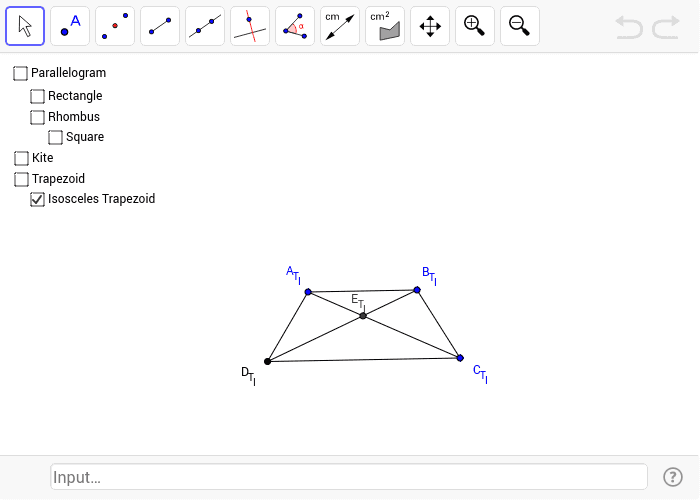
This example locks quadrilaterals into specific types for students to experiment and discover their properties. Commands used include Polygon, Point, Mirror, Intersect, Segment, Distance, etc. Suitable for middle school and above students for geometric construction and exploration.
GeoGebra Commands & Parameters
Polygon(A, B, C, D) → Q, a, b, c, dPolygon(A_P, B_P, C_P, D_P) → P, a_p, b_p, c_p, d_pPoint(Line[C_T, Line[A_T, B_T]]) → D_TPolygon(A_T, B_T, C_T, D_T) → T, a_t, b_t, c_t, d_tMirror(C_{T_I}, LineBisector[Segment[A_{T_I}, B_{T_I}]]) → D_{T_I}Polygon(A_{T_I}, B_{T_I}, C_{T_I}, D_{T_I}) → T_I, a_{t_i}, b_{t_i}, c_{t_i}, d_{t_i}Point(Circle[B_{RH}, Distance[A_{RH}, B_{RH}]]) → C_{RH}Polygon(A_{RH}, B_{RH}, C_{RH}, D_{RH}) → R_H, a_rh, b_{rh}, c_{rh}, d_{rh}Point(Circle[B_K, Distance[A_K, B_K]]) → C_KPoint(LineBisector[A_K, C_K]) → D_KPolygon(A_K, B_K, C_K, D_K) → K, a_k, b_k, c_k, d_kPoint(OrthogonalLine[B_{RE}, Line[A_{RE}, B_{RE}]]) → C_{RE}Polygon(A_{RE}, B_{RE}, C_{RE}, D_{RE}) → R_E, a_{re}, b_{re}, c_{re}, d_{re}Polygon(A_S, B_S, C_S, D_S) → S, a_s, b_s, c_s, d_sIntersect(Segment[A, C], Segment[B, D]) → ESegment(A, E) → AESegment(B, E) → BESegment(D, E) → DESegment(C, E) → CEIntersect(Segment[A_P, C_P], Segment[B_P, D_P]) → E_PSegment(A_P, E_P) → AE_PSegment(B_P, E_P) → BE_PSegment(C_P, E_P) → CE_PSegment(D_P, E_P) → DE_PIntersect(Segment[A_{RE}, C_{RE}], Segment[B_{RE}, D_{RE}]) → E_{RE}Segment(A_{RE}, E_{RE}) → AE_{RE}Segment(B_{RE}, E_{RE}) → BE_{RE}Segment(C_{RE}, E_{RE}) → CE_{RE}Segment(D_{RE}, E_{RE}) → DE_{RE}Intersect(Segment[A_{RH}, C_{RH}], Segment[B_{RH}, D_{RH}]) → E_{RH}Segment(A_{RH}, E_{RH}) → AE_{RH}Segment(B_{RH}, E_{RH}) → BE_{RH}Segment(C_{RH}, E_{RH}) → CE_{RH}Segment(D_{RH}, E_{RH}) → DE_{RH}Intersect(Segment[A_S, C_S], Segment[B_S, D_S]) → E_SSegment(A_S, E_S) → AE_SSegment(B_S, E_S) → BE_SSegment(C_S, E_S) → CE_SSegment(D_S, E_S) → DE_SIntersect(Segment[A_K, C_K], Segment[B_K, D_K]) → E_KSegment(A_K, E_K) → AE_KSegment(B_K, E_K) → BE_KSegment(C_K, E_K) → CE_KSegment(D_K, E_K) → DE_KIntersect(Segment[A_T, C_T], Segment[B_T, D_T]) → E_TSegment(A_T, E_T) → AE_TSegment(B_T, E_T) → BE_TSegment(C_T, E_T) → CE_TSegment(D_T, E_T) → DE_TIntersect(Segment[A_{T_I}, C_{T_I}], Segment[B_{T_I}, D_{T_I}]) → E_{T_I}Segment(A_{T_I}, E_{T_I}) → AE_{T_I}Segment(B_{T_I}, E_{T_I}) → BE_{T_I}Segment(C_{T_I}, E_{T_I}) → CE_{T_I}Segment(D_{T_I}, E_{T_I}) → DE_{T_I}Distance(AE_S, DE_S) → eDistance(A_S, E_S) → distanceASES
AI Drawing Prompt Reference
Draw a quadrilateral ABCD and explore its properties. First, draw quadrilateral ABCD, then draw its symmetric figure P. Next, construct a new quadrilateral T at the intersection of its diagonals D_T. Use transformations like reflection, rotation, and translation to explore different types of quadrilaterals and their properties.
The prompt above was compiled from the original drawing commands and is for reference only.