
Q4-Q7 Geometry & Calculations
Loading the math board and drawing, please wait…
In collections
Exploring Perpendicular Lines in the Coordinate Plane
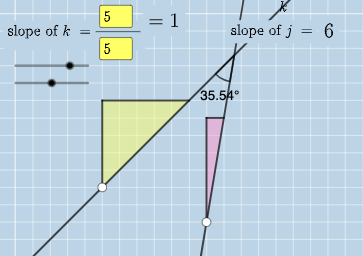
This example demonstrates constructing and calculating geometric properties (like parallelograms, rhombuses) and angles using GeoGebra. Core concepts include angle measurement, polygon properties, slope difference, perimeter calculation, and expected value. Construction highlights commands like Intersect, Angle, Textfield, Polygon, Segment, FractionText, and objects like a, b, c, d, etc. Suitable for high school mathematics teaching, focusing on geometric construction and calculation practice.
GeoGebra Commands & Parameters
Intersect(k, j) → CAngle(A, C, B) → αIntersect(k, eq3) → DAngle(A, D, B) → βIntersect(j, eq4) → EAngle(A, E, B) → γTextfield(a) → InputBox1Textfield(b) → InputBox2Textfield(c) → InputBox3Textfield(d) → InputBox4Polygon(A, F, G) → t1, g, a_1, fSegment(A, F) → hSegment(F, G) → iFractionText(a / b) → text4FractionText(c / d) → text5Polygon(B, H, I) → t2, i_1, b_1, h_1Segment(B, H) → lSegment(H, I) → m
AI Drawing Prompt Reference
Draw a parallelogram ABCD with A and B as one pair of vertices and C and D as the other pair. Measure the angles ABC and BCD and name them α and β respectively. Then, draw a triangle AEF with E and F as vertices and A as a common vertex. Calculate the ratio of AE to AF and display it as a fraction.
The prompt above was compiled from the original drawing commands and is for reference only.