
Q2 Math Example by Tim Brzezinski
Loading the math board and drawing, please wait…
In collections
Exploring Perpendicular Lines in the Coordinate Plane
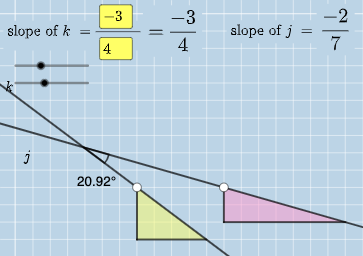
This example demonstrates the use of GeoGebra for calculating and visualizing geometric shapes and angles; it involves core mathematical concepts such as algebra, angle difference and slope, geometry, straight lines, differential equations, expected value, boxplot, rotation, and cubes; construction highlights include commands like Intersect, Angle, Textfield, Polygon, Segment, and FractionText; suitable for high school and above mathematics learners and educators for teaching demonstrations and exploration.
GeoGebra Commands & Parameters
Intersect(k, j) → CAngle(A, C, B) → αIntersect(k, eq3) → DAngle(A, D, B) → βIntersect(j, eq4) → EAngle(A, E, B) → γTextfield(a) → InputBox1Textfield(b) → InputBox2Textfield(c) → InputBox3Textfield(d) → InputBox4Polygon(A, F, G) → t1, g, a_1, fSegment(A, F) → hSegment(F, G) → iFractionText(a / b) → text4FractionText(c / d) → text5Polygon(B, H, I) → t2, i_1, b_1, h_1Segment(B, H) → lSegment(H, I) → m
AI Drawing Prompt Reference
Draw a figure with two intersecting lines k and j at point C. On line k, mark point D such that angle DAB is twice angle CAB. On line j, mark point E such that angle EAB is three times angle CAB. Use input boxes to enter the values of angles DAB, EAB, and CAB, and their ratios. Draw triangles AFG and BIH, connecting points A to F, F to G, B to H, and H to I.
The prompt above was compiled from the original drawing commands and is for reference only.