
Q2 Math Example by Tim Brzezinski (2)
Loading the math board and drawing, please wait…
In collections
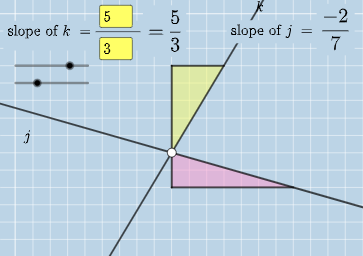
Exploring Parallel Lines in the Coordinate Plane
This example demonstrates interactive geometric and angular analysis using GeoGebra; involves core math concepts like algebra, angles, difference and slope, geometry, straight lines, prism, curve sketching, fractions, parallelogram, and random variables; constructed using GeoGebra commands such as Intersect, Angle, Textfield, Polygon, Segment, FractionText; suitable for high school and above mathematics learners and educators for teaching demonstrations and exploration.
GeoGebra Commands & Parameters
Intersect(k, j) → CAngle(A, C, B) → αIntersect(k, eq3) → DAngle(A, D, B) → βIntersect(j, eq4) → EAngle(A, E, B) → γTextfield(a) → InputBox1Textfield(b) → InputBox2Textfield(c) → InputBox3Textfield(d) → InputBox4Polygon(A, F, G) → t1, g, a_1, fSegment(A, F) → hSegment(F, G) → iFractionText(a / b) → text4FractionText(c / d) → text5Polygon(B, H, I) → t2, i_1, b_1, h_1Segment(B, H) → lSegment(H, I) → m
AI Drawing Prompt Reference
Draw a coordinate-plane geometry figure centered on angle analysis: define a point A with rays that meet two straight lines at points C, D, and E. Construct and label three angles at A, denoted α, β, and γ, each formed between the corresponding pairs of rays. Then sketch two polygonal regions using connected vertices: one closed polygon formed by connecting A with F and G (with its key side segments), and a second closed polygon formed on the other side by connecting B with H and I (with its corresponding side segments). Provide an input area for four parameters and display fraction-style text labels for a/b and c/d.
The prompt above was compiled from the original drawing commands and is for reference only.