
GeoGebra Geometry Construction Example by Tim Brzezinski (3)
Loading the math board and drawing, please wait…
In collections
Special Right Triangle (2): Thinking Classroom Exploration
This example demonstrates dynamic geometric construction and transformation using GeoGebra, involving core math concepts like functions, trigonometry, coordinate geometry, and transformations. Key GeoGebra commands and objects used include Ray, OrthogonalLine, Rotate, Angle, Intersect, Segment, Polygon, Circle, CircleSector, Dilate, Vector, Translate, Midpoint. Suitable for high school students and educators exploring the relationship between geometric properties and function graphs.
GeoGebra Commands & Parameters
Ray(B, C) → fOrthogonalLine(C, f) → gRotate(C, pi / 3, B) → B'Angle(C, B, B') → αRay(B, B') → hIntersect(g, h) → ASegment(B, C) → iSegment(C, A) → jSegment(B, A) → kPolygon(B, C, A) → poly1, c_1, a, bCircle(A, (0.3 * i)) → eIntersect(e, k) → D,Intersect(e, j) → E,CircleSector(A, D, E) → dDilate(A, If[0 < l ≤ 1, 1 - l, 0], B) → C'Vector(A, C') → uTranslate(d, u) → d'Rotate(d', If[1 < l ≤ 2, (((l - 1) * 2) * pi / 3), (2 * pi / 3)], B) → d''Dilate(A, If[2 < l ≤ 3, 3 - l, 0], B) → C'_1Vector(A, C'_1) → vTranslate(d, v) → d'_1Rotate(d'_1, If[3 < l ≤ 4, (((-(l - 3)) * 7) * pi / 6), (-7 * pi / 6)], B) → pDilate(A, If[4 < l ≤ 5, 5 - l, 0], C) → C'_2Vector(A, C'_2) → wTranslate(d, w) → d'_2Dilate(A, If[6 < l ≤ 7, 7 - l, 0], C) → C'_3Vector(A, C'_3) → mTranslate(d, m) → d'_3Rotate(d'_2, If[5 < l ≤ 6, ((-(l - 5)) * pi / 2), ((-pi)) / 2], C) → qRotate(d'_3, If[7 < l ≤ 8, (((l - 7) * 4) * pi / 3), (4 * pi / 3)], C) → rDilate(A, If[8 < l ≤ 9, 9 - l, 0], C) → C'_4Vector(A, C'_4) → nTranslate(d, n) → d'_4Rotate(d'_4, If[9 < l ≤ 10, (((l - 9) * 7) * pi / 6), (7 * pi / 6)], C) → sMidpoint(B, A) → FDilate(B, If[10 < l ≤ 11, 11 - l, 0], C) → A'Segment(B, A') → tRotate(B, If[11 < l ≤ 12, ((l - 11) * pi / 3), pi / 3], B) → A'_1Rotate(A', If[11 < l ≤ 12, ((l - 11) * pi / 3), pi / 3], B) → A''Segment(A'_1, A'') → t'Dilate(B, If[12 < l ≤ 13, 13 - l, 0], F) → A'_2Vector(B, A'_2) → u_1Translate(B, u_1) → A'_3Translate(A', u_1) → A''_1Segment(A'_3, A''_1) → t'_1Rotate(A'_3, If[13 < l ≤ 14, ((l - 13) * pi / 3), pi / 3], F) → GRotate(A''_1, If[13 < l ≤ 14, ((l - 13) * pi / 3), pi / 3], F) → HSegment(G, H) → f_1
AI Drawing Prompt Reference
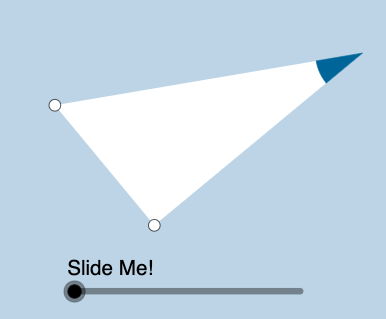
The figure consists of points, rays, perpendicular lines, rotations, angles, intersections, line segments, polygons, circles, and circular arcs. Construction begins with points B and C, drawing rays and perpendicular lines. Rotating point B and measuring angles leads to intersecting rays forming point A. Connecting B, C, and A creates a polygon. A circle centered at A with radius related to segment BC intersects line segments at points D and E, and circular arcs are drawn between A, D, and E. Further transformations such as scaling, translation, and rotation generate multiple figure variations. Finally, using the midpoint F of B and A, additional transformations are applied. The overall figure demonstrates dynamic geometric constructions and their relationship to function graphs.
The prompt above was compiled from the original drawing commands and is for reference only.