
Pythagoras' Theorem -- Rectangle and Parallelogram
Loading the math board and drawing, please wait…
In collections
Mathematics Form 1
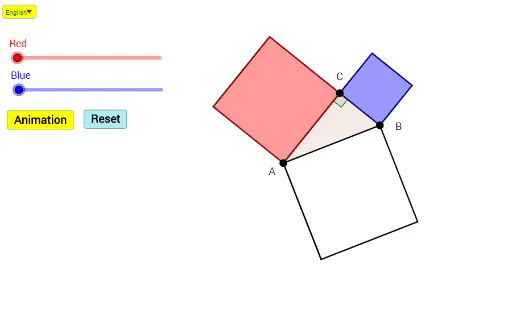
This example demonstrates Pythagoras' Theorem in rectangles and parallelograms. Key mathematical concepts include Pythagoras' Theorem, properties of rectangles and parallelograms. Using GeoGebra commands such as If, Segment, Point, etc., the construction of rectangles and parallelograms is shown, along with transformations like rotation and translation to illustrate the theorem. Suitable for middle and high school students learning geometric construction and Pythagoras' Theorem.
GeoGebra Commands & Parameters
If(b > 1, 1, b) → b_1Segment(A, B) → fSemicircle(A, B) → cPoint(c) → CRotate(C, (-(90°)), B) → C'_1Rotate(B, (-(90°)), C'_1) → B'OrthogonalLine(C, f) → tRotate(C, 90°, A) → C'Rotate(A, 90°, C') → A'Line(C', A') → sIntersect(s, t) → DVector(B', D) → vIf(a > 1, 1, a) → a_1Vector(A', D) → uSegment(A, C) → gSegment(C, B) → hSegment(C, A') → iSegment(A', C') → jSegment(C', A) → kSegment(C, B') → lSegment(B', C'_1) → mSegment(C'_1, B) → nRotate(A, 90°, B) → A'_1Rotate(B, 90°, A'_1) → B'_1Segment(A, B'_1) → pSegment(B'_1, A'_1) → qSegment(A'_1, B) → rTranslate(C', Vector[(a_1 * u)]) → C''Translate(A', Vector[(a_1 * u)]) → A''Polygon(C'', A, C, A'') → poly1, c_3, d_1, c_1, d_2Line(B', C'_1) → dTranslate(C'_1, Vector[(b_1 * v)]) → ETranslate(B', Vector[(b_1 * v)]) → B''Polygon(B'', C, B, E) → poly2, e_1, c_2, e_2, eIf(a < 1, 0, a > 2, 1, a - 1) → a_2If(b < 1, 0, b > 2, 1, b - 1) → b_2If(a < 2.5, 0, a - 2.5) → a_3If(b < 2.5, 0, b - 2.5) → b_3Intersect(t, f) → FVector(C, F) → wTranslate(C, Vector[(a_2 * w)]) → C'_2Translate(A'', Vector[(a_2 * w)]) → A'''Polygon(C'', A''', C'_2, A) → poly3, c'', a''', c'_2, a_4Vector(A, B'_1) → u_1Translate(C'', Vector[(a_3 * u_1)]) → C'''Translate(A''', Vector[(a_3 * u_1)]) → GTranslate(C'_2, Vector[(a_3 * u_1)]) → HTranslate(A, Vector[(a_3 * u_1)]) → A'_2Polygon(C''', G, H, A'_2) → poly3', c''', g_1, h_1, a'_2Translate(B'', Vector[(b_2 * w)]) → B'''Translate(C, Vector[(b_2 * w)]) → C'_3Polygon(B''', E, B, C'_3) → poly4, b''', e_3, b_4, c'_3Translate(B''', Vector[(b_3 * u_1)]) → ITranslate(E, Vector[(b_3 * u_1)]) → E'Translate(B, Vector[(b_3 * u_1)]) → B'_2Translate(C'_3, Vector[(b_3 * u_1)]) → JPolygon(I, E', B'_2, J) → poly4', i_1, e', b'_2, j_1Angle(A, C, B) → αPolygon(A, B, C) → poly5, c_4, a_5, b_5SelectedIndex(Bahasa) → nn
AI Drawing Prompt Reference
Draw a semicircle with a diameter segment, place a point on the arc, and form a right triangle. Construct squares outward on each of the three sides. For the square on the hypotenuse, use rotations and translations to create parallelograms and rectangles that visually demonstrate the area relationship. Include sliders to control the shifting of parts, showing the Pythagorean theorem dynamically. The final figure shows a right triangle, three squares, several parallelograms, and auxiliary lines in a symmetric layout.
The prompt above was compiled from the original drawing commands and is for reference only.