
Proof Without Words via Symmetry Transforms
Loading the math board and drawing, please wait…
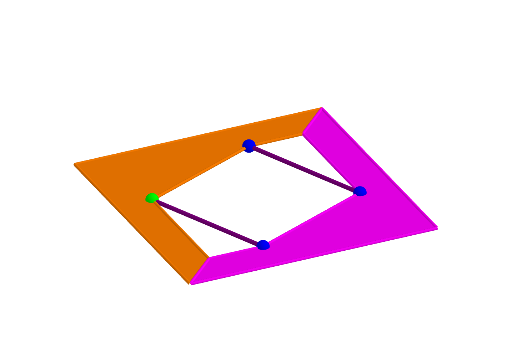
This GeoGebra example demonstrates a “proof without words” by building a geometry figure whose key relationship (often expressed as an inequality) is revealed through symmetry. It highlights geometric symmetry and invariance under transformations such as reflection (Mirror) and rotation (Rotate). The construction relies on creating and connecting points (Point) and polygonal regions (Polygon), locating points relative to regions with PointIn, then using lines and segments (Line, Segment) to form measurable geometric structures. Intersections (Intersect) of transformed elements generate the new corresponding points that encode the quantities to be compared, making the inequality or constraint visually apparent. The example is well-suited for advanced high-school students, geometry-focused classes, and math contest preparation that emphasizes understanding proofs through dynamic geometry.
GeoGebra Commands & Parameters
Point(yAxis) → APoint(xAxis) → BPoint(xAxis) → DPolygon(A, B, C) → t1, c, a, bPolygon(A, D, C) → t2, c_1, a_1, dPointIn(t1) → EMirror(E, zAxis) → E'Rotate(E, 90°, zAxis) → E'_1Mirror(E'_1, zAxis) → FLine(E, c) → fLine(F, a) → gLine(E', a_1) → hLine(E'_1, c_1) → iIntersect(f, i) → GIntersect(f, g) → HIntersect(h, g) → IIntersect(h, i) → JPolygon(A, G, E, F, I, C, B) → poly1, a_2, g_1, e, f_1, i_1, c_2, b_1Polygon(A, G, E'_1, E', I, C, D) → poly2, a_3, g_2, e'_1, e', i_2, c_3, d_1Rotate(poly2, α, xAxis) → poly2'Rotate(E', α, xAxis) → E''Rotate(E'_1, α, xAxis) → KSegment(F, E'') → jSegment(E, K) → k
AI Drawing Prompt Reference
On a coordinate plane, place a point on the vertical axis and two points on the horizontal axis. Together with a fixed third point, form two triangles sharing a common side. Pick a point inside one triangle, reflect it across the vertical axis, rotate it 90 degrees, then reflect again to get another point. From these points, draw lines parallel to the triangle sides; their intersections create four new points. Connect these with the original vertices to form two polygons. Rotate one polygon about the horizontal axis, and connect corresponding rotated points to the original ones with segments, revealing symmetry-based relationships.
The prompt above was compiled from the original drawing commands and is for reference only.