
Group 6 Geometric Pattern: Rotation-Based Construction with Circle and Inequalit
Loading the math board and drawing, please wait…
In collections
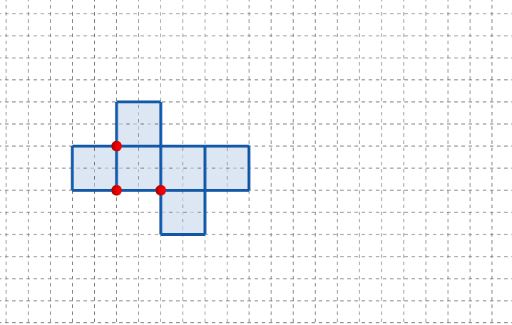
長方體有多少個摺紙圖樣?
This example demonstrates how a set of geometric patterns can be generated and compared using rotation transformations, highlighting relationships to circle-related properties (e.g., circumcircle/circumscribed circle) and inequality conditions. The main mathematical ideas include geometric construction, rotation as a rigid transformation (Rotate), and the way circle geometry and inequality constraints manifest through observable configuration features. In the GeoGebra build, the construction uses the commands Point, Polygon, and Rotate to create key vertices and polygonal shapes. The objects referenced in the construction summary—such as A, B, C, and parameter-driven points like q1, q2, q4, q5, q6 together with their primed counterparts—serve as the rotated positions and comparative markers. Slider-like parameters (t and t') and interactive buttons (button1, button2) support controlled switching or animation between configurations, forming a “group” of related diagrams. Suitable for interactive geometry lessons, enrichment activities, and contest geometry practice where students connect transformations with circle properties and visualize inequality reasoning.
GeoGebra Commands & Parameters
Point(Ray[(1, 0), (3, 0)]) → APoint(Ray[A + (1, 0), A + (2, 0)]) → CPoint(Ray[A + (0, 1), A + (0, 2)]) → BPolygon({(0, 0), A, B, (0, y(B))}) → q1Polygon({A, C, (x(C), y(B)), B}) → q2Polygon({B, B + (0, l), B + (h, l), B + (h, 0)}) → q4Polygon({C, C + (l, 0), C + (l, w), C + (0, w)}) → q5Polygon({C + (l, 0), C + (l + h, 0), C + (l + h, w), C + (l, w)}) → q6Rotate(q2, (90° * t), Line[B, A]) → q2'Rotate(Rotate[q5, (90° * t), Line[C + (0, w), C]], (90° * t), Line[B, A]) → q5'Rotate(Rotate[Rotate[q6, (90° * t), Line[C + (l, w), C + (l, 0)]], (90° * t), Line[C + (0, w), C]], (90° * t), Line[B, A]) → q6'_{1}Polygon({C, C + (0, (-h)), C + (l, (-h)), C + (l, 0)}) → q3Rotate(Rotate[Rotate[q3, (90° * t), Line[C + (l, 0), C]], (90° * t), Line[C + (0, w), C]], (90° * t), Line[B, A]) → q3'Rotate(Rotate[q4, (90° * t), Line[B, B + (h, 0)]], (90° * t), Line[B, A]) → q4'
AI Drawing Prompt Reference
Create a geometric pattern based on rotation, including five polygons q1, q2, q4, q5, and q6, and their rotated versions q2', q5', q6'_1, q3', and q4'. Start by drawing points A, B, and C, then construct polygons q1, q2, q4, q5, and q6. Next, rotate these polygons around points A and B by 90 degrees to generate the rotated versions q2', q5', q6'_1, q3', and q4'.
The prompt above was compiled from the original drawing commands and is for reference only.