
Projective Geometry of the GeoGebra Ellipse: Construction and Properties
Loading the math board and drawing, please wait…
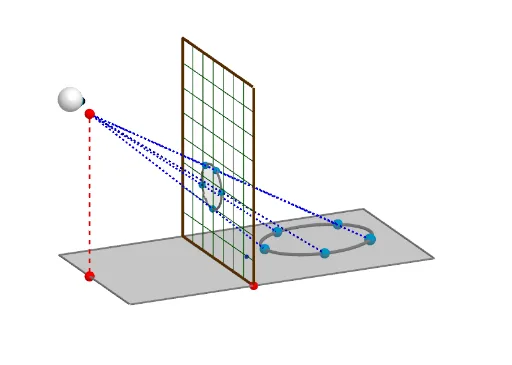
This GeoGebra example dynamically illustrates the projective geometry of an ellipse, showing how the conic arises as a section of a cylinder or pyramid and how projective correspondences are built using mirrors, midpoints, and lines. The core mathematical concepts include projective geometry, cross-ratio, involution, pole-polar relationships, and the unified treatment of conics as projections of circles. The construction uses GeoGebra commands such as Intersect, Mirror, Polygon, PointIn, Midpoint, Segment, Point, Line, Conic, Sphere, and Sequence, involving objects like b, E_1, a, F_1, G_1, FF, poly5, ff', ff, f_2, g_2, u, v, A, D, D', B, B', poly1, d', b', d, b_1, L, F, c, G, w, R, e, H, Q, poly3, r, q, h, g, E, and t. It is suitable for high school to university students studying analytic geometry, projective geometry, or using dynamic geometry software for exploratory learning, and serves as a powerful demonstration for teachers to visualize the connection between conics and projective transformations.
GeoGebra Commands & Parameters
Intersect(xAxis, yAxis) → E_1Mirror(F_1, yAxis) → G_1Mirror(FF, yAxis) → FF'Polygon(FF', FF, F_1, G_1) → poly5, ff', ff, f_2, g_2Mirror(D, A) → D'Mirror(B, A) → B'Polygon(D', B', D, B) → poly1, d', b', d, b_1PointIn(poly1) → LMidpoint(d) → FSegment(F, D) → cPoint(c) → GLine(G, b') → eIntersect(e, d') → HPolygon(R, Q, H, G) → poly3, r, q, h, gPoint(b') → ESegment(L, E) → tIntersect(t, e) → USegment(E, O) → fLine(U, f) → c_1Point(f) → PSegment(P, L) → iIntersect(c_1, i) → VLine(V, q) → r_2Intersect(r_2, h) → B_2Segment(V, B_2) → t_2Mirror(H, D') → H'Midpoint(D', F) → IMidpoint(d') → JPointIn(poly1) → KPointIn(poly1) → MPointIn(poly1) → NPolygon(L, N, M, K) → poly2, l, n, m, kSegment(P, N) → jSegment(P, M) → pSegment(P, K) → sSegment(K, E) → a_1Intersect(a_1, e) → SIntersect(e, h) → TLine(S, f) → d_1Intersect(d_1, s) → WSegment(N, E) → e_1Segment(M, E) → f_1Intersect(e_1, e) → A_1Intersect(f_1, e) → B_1Line(A_1, f) → g_1Intersect(j, g_1) → C_1Line(B_1, f) → h_1Intersect(h_1, p) → D_1Polygon(V, C_1, D_1, W) → poly4, v_1, c_2, d_2, w_1Segment(P, E) → i_1Segment(D, E) → j_1Line(C_1, V) → l_1Intersect(l_1, r) → J_1Intersect(l_1, h) → K_1Segment(R, J_1) → m_1Segment(G, K_1) → n_1Line(D_1, W) → q_1Intersect(r, q_1) → L_1Intersect(h, n_1) → M_1Intersect(q_1, h) → N_1Segment(R, L_1) → r_1Line(V, W) → a_2Intersect(g, a_2) → O_1Line(C_1, D_1) → e_2Intersect(e_2, g) → P_1Intersect(l_1, q_1) → U_1Segment(N_1, U_1) → k_2Line(W, r) → k_1Line(W, g) → p_1Intersect(k_1, g) → I_1Intersect(p_1, h) → Q_1Segment(I_1, G) → t_1Segment(G, Q_1) → i_2Line(D_1, g) → s_1Line(D_1, r) → b_2Intersect(b_2, g) → R_1Intersect(h, poly1) → S_1, S_2Intersect(s_1, h) → T_1Segment(R_1, D_1) → h_2Segment(D_1, T_1) → j_2Line(WH, ff') → l_2Line(WL, g_2) → m_2Intersect(l_2, m_2) → V_1Line(DH, ff') → n_2Line(DL, g_2) → p_2Intersect(p_2, n_2) → W_1Line(V, r) → q_2Intersect(q_2, poly3) → Z_1, A_2Segment(V, A_2) → s_2Line(VD, g_2) → a_3Line(VH, ff') → b_3Intersect(a_3, b_3) → C_2Line(C_1, r) → c_3Line(C_1, g) → d_3Intersect(h, poly1) → D_2, D_3Intersect(h, poly1) → E_2, E_3Intersect(c_3, q) → F_2Intersect(h, poly1) → G_2, G_3Intersect(d_3, h) → H_2Segment(F_2, C_1) → e_3Segment(C_1, H_2) → f_3Line(CH, ff') → g_3Line(CL, g_2) → h_3Intersect(g_3, h_3) → I_2Polygon(C_2, V_1, W_1, I_2) → poly6, c_4, v_2, w_2, i_3PointIn(poly1) → L_2Conic(L_2, K, L, N, M) → k_3Segment(L_2, P) → j_3Segment(E, L_2) → l_3Intersect(l_3, poly1) → M_2, M_3Intersect(l_3, poly1) → N_2, N_3Intersect(e, l_3) → O_2Line(O_2, g) → m_3Intersect(m_3, j_3) → P_2Conic(W, V, C_1, D_1, P_2) → p_3Line(P_2, r) → n_3Line(P_2, g) → q_3Intersect(n_3, g) → Q_2Intersect(q_3, h) → R_2Segment(P_2, R_2) → r_3Segment(P_2, Q_2) → s_3Conic(ZH, V_1, C_2, I_2, W_1) → t_3Line(P, A) → f_4Point(f_4) → CSphere(C - (0, 0.13, -0.05), 0.3) → o_1Sphere(C, 0.2) → u_1Sequence(R + (i * Vector[R, Q]), i, 0, 1, 1 / o_2) → l1Sequence(G + (i * Vector[R, Q]), i, 0, 1, 1 / o_2) → l2Sequence(G + (i * Vector[G, R]), i, 0, 1, 1 / u_2) → l3Sequence(H + (i * Vector[G, R]), i, 0, 1, 1 / u_2) → l4Sequence(Segment[Element[l3, i], Element[l4, i]], i, 1, Length[l3]) → l5Sequence(Segment[Element[l1, i], Element[l2, i]], i, 1, Length[l1]) → l6
AI Drawing Prompt Reference
Draw an ellipse with its projective geometry construction. Start with coordinate axes and two symmetric points about the vertical axis, forming a quadrilateral. Add another symmetric quadrilateral and pick a point inside it. Connect this point to a midpoint of one side, then take a point on this segment and draw a line through it intersecting another side. Continue constructing intersections and lines to form triangles and quadrilaterals. Finally, select several random interior points and connect them to exterior points, creating intersecting segments. Mark all intersection points. The result is a complex geometric network illustrating the ellipse's projective properties.
The prompt above was compiled from the original drawing commands and is for reference only.