
Projection of Cuboid Diagonal: Q3
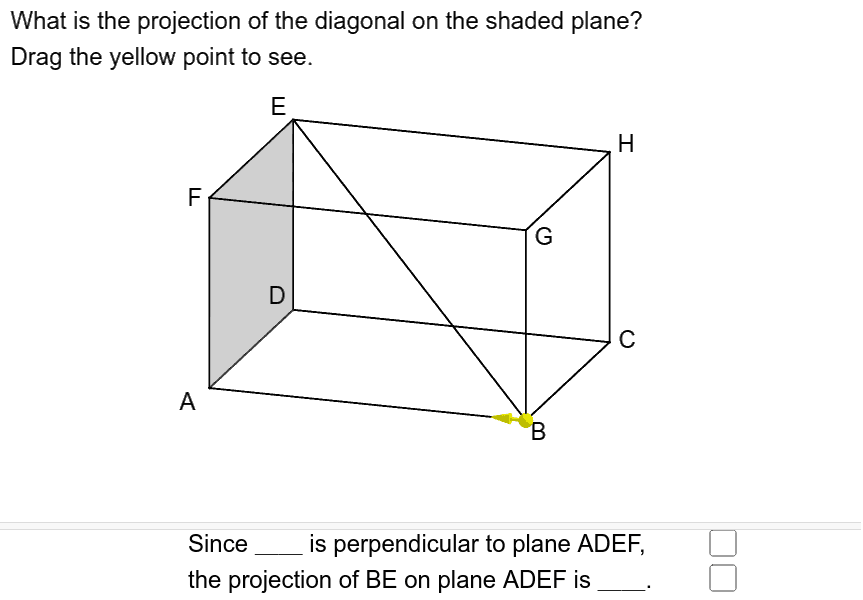
Loading the math board and drawing, please wait…
In collections
Projections and Angles
① This example demonstrates the orthogonal projections of a cuboid’s space diagonal onto the three coordinate planes, visually showing the angles between the diagonal and each face. ② Core mathematical concepts include solid geometry, spatial vectors, projection theorems, trigonometric functions (sine, cosine), and angle computation. ③ Construction highlights: the GeoGebra commands Translate, Segment, Point, Vector, and Angle are used to create vertices A, B, C, D, E, F, G, H, P and auxiliary objects such as poly1, a, i, j, u, α, text1, text2, ans1, ans2, if, f for drawing projection segments and labeling angles. ④ Suitable for high‑school solid geometry lessons, university analytic geometry demonstrations, and as a GeoGebra modeling exercise.
GeoGebra Commands & Parameters
Translate(Polygon[A, D, E, F], Vector[(0, 0)]) → poly1Translate(Prism[Polygon[A, A + (5, 0), A + (5, 4), A + (0, 4)], 3], Vector[(0, 0)]) → aSegment(B, E) → iPoint(Segment[B, A]) → PSegment(A, E) → fSegment(B, P) → jVector(P, P - (0.6, 0, 0)) → uAngle(B, A, E) → α
AI Drawing Prompt Reference
Draw the space diagonal of a three-dimensional cuboid and show its orthogonal projections onto the three coordinate planes. The projection lines form angles with the cuboid's faces, and label these angles to illustrate the relationship between the diagonal and the faces. Construct by first determining the cuboid's vertices, then drawing the diagonal, projecting to planes, and finally labeling angles.
The prompt above was compiled from the original drawing commands and is for reference only.