
Cube Mirror with Rotation Transform
Loading the math board and drawing, please wait…
In collections
geometriadinamica.es
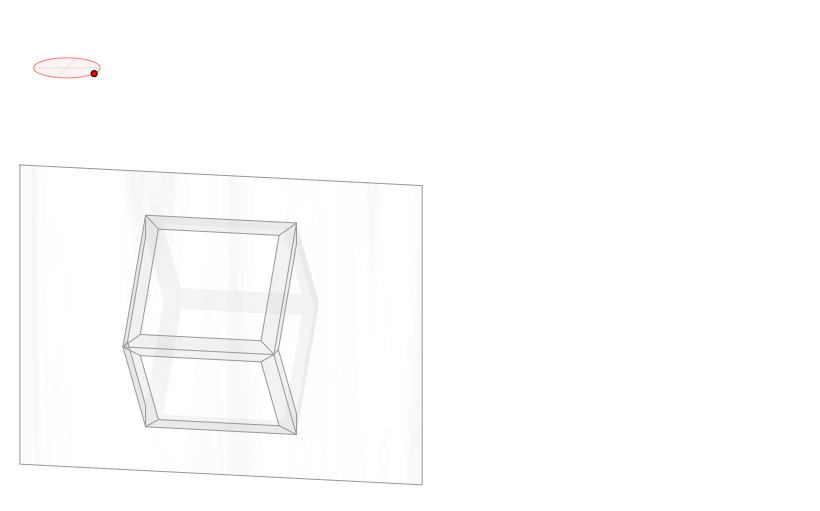
This GeoGebra example demonstrates how to create a cube with mirror effects and apply rotation transformations in 3D space. Core mathematical concepts include 3D vectors, rotation angles, coordinate axis transformations, and ellipse projections. Construction uses: Punto3D for creating 3D points, Vector for spatial vectors, Angle for defining rotation, Line and Segment for drawing lines, Ellipse for projection elements, Polygon for creating surfaces, and Intersect for finding intersections. Suitable for high school and college students studying solid geometry and spatial transformations, helping understand 3D coordinate systems, rotation matrices, and mirror symmetry concepts.
GeoGebra Commands & Parameters
Ellipse((-3.62, 5 + nada), (-2.38, 5 + nada), 0.65) → zElipse1Point(zElipse1) → XYAngle((-2, 5), (-3, 5), XY) → zAngRotEllipse((-3, 4.38), (-3, 5.62), 0.65) → zElipse2Point(zElipse2) → ZAngle((-3, 6), (-3, 5), Z) → zAngIncLine(O, zX) → zEjeXLine(O, zY) → zEjeYLine(O, zZ) → zEjeZVector(O, zX) → zVectorXVector(O, zY) → zVectorYVector(O, zZ) → zVectorZIntersect(zElipse2, zElipse1, 1) → zPunto1Intersect(zElipse2, zElipse1, 4) → zPunto2Segment((-3, 4.35) + O, (-3, 5.65) + O) → zSeg1Segment(zPunto1, zPunto2) → zSeg2Segment((-3.65, 5) + O, (-2.35, 5) + O) → zSeg3Punto3D(XY, Z, E1) → E1'Punto3D(XY, Z, E2) → E2'Punto3D(XY, Z, E3) → E3'Punto3D(XY, Z, E4) → E4'Punto3D(XY, Z, F1) → F1'Punto3D(XY, Z, F2) → F2'Punto3D(XY, Z, F3) → F3'Punto3D(XY, Z, F4) → F4'Punto3D(XY, Z, V1) → V1'Punto3D(XY, Z, V2) → V2'Punto3D(XY, Z, V3) → V3'Punto3D(XY, Z, V4) → V4'Punto3D(XY, Z, V5) → V5'Punto3D(XY, Z, V6) → V6'Punto3D(XY, Z, V7) → V7'Punto3D(XY, Z, V8) → V8'Angle(E1', E2', E4') → angPolygon(V7', V1', V15', V73') → poly13, v7', v1'_3, v15'_1, v73'Polygon(V7', V5', V51', V73') → poly14, v7'_1, v5'_3, v51'_1, v73'_1Polygon(V1', V18', V72', V7') → poly15, v1'_4, v18', v72', v7'_2Polygon(V1', V18', V27', V2') → poly16, v1'_5, v18'_1, v27', v2'_3Polygon(V2', V27', V81', V8') → poly17, v2'_4, v27'_1, v81', v8'Polygon(V8', V81', V72', V7') → poly18, v8'_1, v81'_1, v72'_1, v7'_3Polygon(V2', V26', V84', V8') → poly19, v2'_5, v26'_1, v84', v8'_2Polygon(V8', V84', V62', V6') → poly20, v8'_3, v84'_1, v62'_1, v6'_3Polygon(V7', V76', V85', V8') → poly21, v7'_4, v76', v85', v8'_4Polygon(V7', V76', V58', V5') → poly22, v7'_5, v76'_1, v58', v5'_4Polygon(V5', V58', V67', V6') → poly23, v5'_5, v58'_1, v67', v6'_4Polygon(V8', V85', V67', V6') → poly24, v8'_5, v85'_1, v67'_1, v6'_5Polygon(E1', F1', F4', E4') → tapa_i, e1'_1, f1', f4', e4'_1Polygon(E2', F2', F3', E3') → tapa_d, e2'_1, f2', f3', e3'_1Polygon(V1', V15', V37', V3') → poly1, v1', v15', v37', v3'Polygon(V3', V37', V51', V5') → poly2, v3'_1, v37'_1, v51', v5'Polygon(V1', V14', V32', V3') → poly3, v1'_1, v14', v32', v3'_2Polygon(V3', V4', V41', V32') → poly4, v3'_3, v4', v41', v32'_1Polygon(V3', V36', V54', V5') → poly5, v3'_4, v36', v54', v5'_1Polygon(V3', V36', V45', V4') → poly6, v3'_5, v36'_1, v45', v4'_1Polygon(V5', V54', V63', V6') → poly7, v5'_2, v54'_1, v63', v6'Polygon(V6', V4', V45', V63') → poly8, v6'_1, v4'_2, v45'_1, v63'_1Polygon(V1', V2', V23', V14') → poly9, v1'_2, v2', v23', v14'_1Polygon(V2', V4', V41', V23') → poly10, v2'_1, v4'_3, v41'_1, v23'_1Polygon(V2', V26', V48', V4') → poly11, v2'_2, v26', v48', v4'_4Polygon(V4', V6', V62', V48') → poly12, v4'_5, v6'_2, v62', v48'_1Polygon(E1', E2', E3', E4') → espejo, e1', e2', e3', e4'Punto3D(XY, Z, R1) → R1'Punto3D(XY, Z, R2) → R2'Punto3D(XY, Z, R4) → R4'
AI Drawing Prompt Reference
Draw a cube with mirror effects and rotation transformations. Start by drawing two ellipses, then use their intersection points to create line segments. Next, construct the cube's faces using these segments and points. Finally, apply rotation and mirroring to show the cube's transformation in 3D space.
The prompt above was compiled from the original drawing commands and is for reference only.