
Projecting the Plane onto a Sphere
Loading the math board and drawing, please wait…
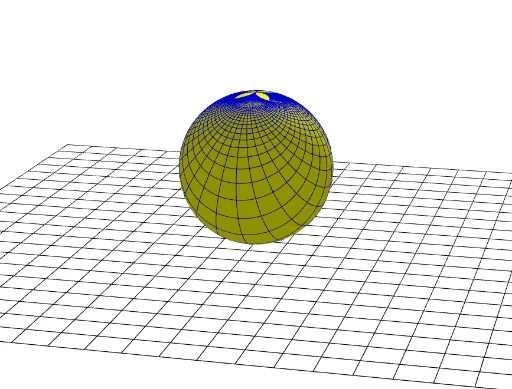
This example demonstrates how points on a plane are mapped onto the surface of a sphere through a projection, creating a visual geometric transformation. The core mathematical concepts involve spherical geometry, projection transformations, mirror operations, and sequence generation. The construction uses GeoGebra commands such as Point, Intersect, Sphere, Mirror, and Sequence to create points A, B, and sphere a, then generates a series of projected points B' and auxiliary objects L_1 through L_6 via mirroring and sequencing, illustrating the projection from plane to sphere. It is suitable for high school or undergraduate courses in solid geometry, transformation geometry, or introductory computer graphics, helping students intuitively understand projections and spherical coordinates.
GeoGebra Commands & Parameters
Point(zAxis) → AIntersect(xAxis, zAxis) → BSphere(A, B) → aMirror(B, A) → B'Sequence(Plane[B', Line[(-10, a, 0), (10, a, 0)]], a, -20, 20) → L_1Sequence(IntersectPath[Element[L_1, i], a], i, 1, Length[L_1]) → L_2Sequence(Segment[(-10, a, 0), (10, a, 0)], a, -10, 10) → L_3Sequence(Segment[(a, -10, 0), (a, 10, 0)], a, -10, 10) → L_4Sequence(Plane[B', Segment[(a, -10, 0), (a, 10, 0)]], a, -20, 20) → L_5Sequence(IntersectPath[Element[L_5, i], a], i, 1, Length[L_5]) → L_6