
Deriving Hyperbola Definition from a Cone
Loading the math board and drawing, please wait…
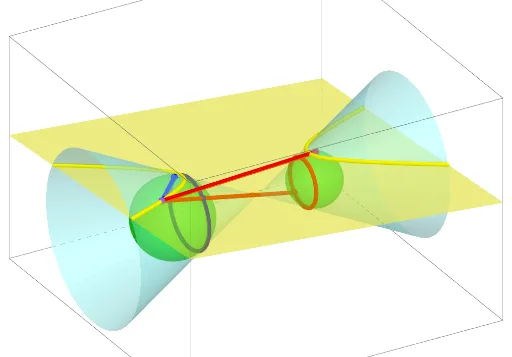
This example demonstrates how to derive the definition of a hyperbola by intersecting a plane with a cone. The core mathematical concepts include conic sections (hyperbola), trajectory of intersection between a plane and a cone, and solid geometry. Construction key points: use the Cone command to create a cone, Plane command to define cutting planes, Intersect command to generate the hyperbola curve, and Rotate/Angle commands for dynamic visualization. Suitable for high school or university mathematics courses, helping students understand the relationship between conic sections and solid geometry, and master the geometric definition of hyperbolas in coordinate geometry.
GeoGebra Commands & Parameters
Point(yAxis) → E_1Intersect(xAxis, yAxis) → D_1Point(yAxis) → C_1Line(E_1, C_1) → e_2Point(e_2) → CCircle(E_1, 2, e_2) → f_2Cone(f_2, 4) → w_1, g_2, h_2PointIn(h_2) → H_1PointIn(h_2) → G_1PointIn(h_2) → F_1Plane(F_1, G_1, H_1) → i_2OrthogonalLine(C, i_2) → eIntersect(e, i_2) → DPlane(D_1, C, D) → fIntersectPath(i_2, w_1) → k_2Intersect(f, k_2) → A_2, B_2Intersect(xAxis, yAxis) → ARotate(B, a°, A) → GRotate(B, a°, A) → B'Angle(B, A, B') → αLine(C_1, E_1) → b_{11}Circle(C_1, 2, b_{11}) → c_2Cone(c_2, 4) → u_1, d_2, v_1Corner(k_2) → I_1, J_1, T, UIntersectPath(i_2, u_1) → q_2Corner(q_2) → M_1, N_1, V, WLine(B_2, A_2) → gIntersect(g, k_2, 1) → EIntersect(g, q_2, 2) → FLine(E, D_1) → hMidpoint(E, D_1) → HSphere(E, H) → iIntersect(g, i, 1) → IMidpoint(H, I) → JLine(E, J) → jIntersect(j, e_2) → KLine(D_1, F) → mMidpoint(D_1, F) → LSphere(F, L) → nIntersect(g, n, 2) → MMidpoint(M, L) → NLine(F, N) → pIntersect(e_2, p) → OOrthogonalLine(K, i_2) → qOrthogonalLine(O, i_2) → rIntersect(r, i_2) → PIntersect(q, i_2) → QSphere(K, Q) → oSphere(O, P) → sOrthogonalLine(K, h, space) → tOrthogonalLine(O, h, space) → a_1Intersect(a_1, h) → RIntersect(t, h) → SOrthogonalPlane(R, e_2) → uOrthogonalPlane(S, e_2) → vIntersectPath(u, s) → c_1IntersectPath(v, o) → d_1Point(xAxis) → ZCircle(D_1, Z) → f_1OrthogonalLine(D_1, xOyPlane) → g_1Point(g_1) → A_1Sphere(D_1, A_1) → h_1Intersect(e_2, h_1, 2) → B_1Midpoint(B_1, A_1) → K_1OrthogonalPlane(D_1, e_2) → i_1IntersectPath(xOyPlane, i_1) → j_1Intersect(j_1, f_1, 2) → L_1Plane(L_1, D_1, K_1) → k_1Point(f_1) → O_1Rotate(O_1, a°, D_1) → P_1Angle(O_1, D_1, P_1) → βOrthogonalLine(P_1, xOyPlane) → m_1Intersect(m_1, k_1) → Q_1OrthogonalLine(Q_1, i_1) → n_1Intersect(n_1, i_1) → R_1Intersect(n_1, h_2, 2) → S_1Line(D_1, S_1) → p_1Intersect(p_1, k_2, 1) → T_1Segment(T_1, P) → r_1Line(T_1, D_1) → a_2Intersect(r_1, q_2, 2) → U_1Line(D_1, U_1) → j_2Intersect(j_2, c_1, 1) → V_1Intersect(a_2, d_1, 1) → W_1Segment(T_1, Q) → q_1Segment(T_1, P) → l_2Intersect(a_2, c_1, 1) → Z_1Segment(Z_1, T_1) → m_2Segment(T_1, W_1) → n_2IntersectPath(f, i_2) → l_1
AI Drawing Prompt Reference
Draw a cone with its base center on the vertical axis, base radius 2, and height 4. Pick three points on the cone's lateral surface to define a cutting plane that intersects the cone, producing a hyperbola. Create a second cone with the same dimensions but its base center shifted along the vertical axis, and cut it with the same plane to get another hyperbola. Connect the intersection points of the two hyperbolas with a line, and construct auxiliary points, midpoints, perpendiculars, and spheres along this line to illustrate the geometric relationship between the hyperbola definition and conic sections. The scene shows a 3D solid geometry setup with cones, cutting planes, hyperbola curves, and auxiliary constructions.
The prompt above was compiled from the original drawing commands and is for reference only.