
Position Vector of Triangle's Center of Gravity
Loading the math board and drawing, please wait…
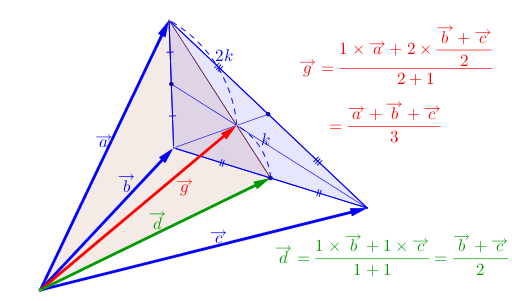
This example demonstrates how to construct the position vector of a triangle's center of gravity using GeoGebra. Key math concepts include vectors, polygons, midpoints, segments, and intersections. The construction involves commands like Vector, Polygon, Midpoint, Segment, and Intersect, as outlined in the summary. It is suitable for middle school and above, focusing on geometric applications of centroids and vectors.
GeoGebra Commands & Parameters
Vector(E, C) → uVector(E, D) → vVector(E, F) → wPolygon(C, D, F) → 다각형1, f, c, dMidpoint(c) → GMidpoint(d) → HSegment(G, C) → aSegment(D, H) → bIntersect(a, b) → IVector(E, I) → zMidpoint(f) → JSegment(J, C) → hSegment(J, D) → iSegment(D, G) → jSegment(G, F) → kSegment(F, H) → mSegment(H, C) → nSegment(J, F) → qSegment(D, H) → rVector(E, G) → w_1도구1(C, I) → g_1도구1(I, G) → h_1Polygon(C, E, G) → 다각형2, g_2, c_2, e_2Polygon(D, E, F) → 다각형3, f_1, d_2, e_3
AI Drawing Prompt Reference
Draw a triangle and its centroid's position vector. The triangle is formed by three points, and the centroid's position vector is determined by connecting the midpoints of the sides and finding their intersection. The construction order includes first determining the triangle vertices, then finding the midpoints of the sides, connecting the midpoints, and finally obtaining the centroid's position vector.
The prompt above was compiled from the original drawing commands and is for reference only.