
Practice Sine Range and Period (Degrees)
Loading the math board and drawing, please wait…
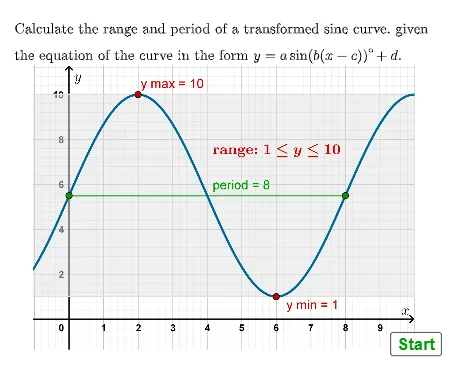
① This interactive example provides practice on the range and period of the sine function in degree mode. ② Core math concepts include the sine function's range ([-1,1]), period (360°), and transformations. ③ Construction highlights: uses GeoGebra commands such as Textfield, InputBox, Random, RandomElement, If, Simplify, and AreEqual; objects include stmin, stmax, stperiod for storing answers, alist and bdeglist for random parameters, and buttons (button1-3) with validation tags (tagmin, tagmax, tagperiod) for interactive feedback. ④ Suitable for high school trigonometry lessons or self-study, reinforcing fundamental properties of sine, and can be used as classroom practice or assessment.
GeoGebra Commands & Parameters
Textfield(stmin) → InputBox1Random(-20, 20) → dDRandomElement(alist) → aARandomElement(bdeglist) → bBRandomElement(c1list) → c1RandomElement(c2list) → c2If(bB ≥ 12, c1, c2) → cCSimplify((bB * (x - cC))) → gIf(aA ≟ 1, sin((g(x))°) + dD, If[aA ≟ -1, (-sin((g(x))°)) + dD, (aA * sin((g(x))°)) + dD]) → fAreEqual(InputBox1, ansmin) → corrminTextfield(stmax) → InputBox2Textfield(stperiod) → InputBox3AreEqual(InputBox2, ansmax) → corrmaxAreEqual(InputBox3, ansperiod) → corrperiod
AI Drawing Prompt Reference
Draw the graph of a sine function to explore its range and period. Use degree mode and adjust parameters a, b, and c to change the amplitude, phase, and shift of the sine function. Input the minimum value, maximum value, and period through the input boxes to check your answers.
The prompt above was compiled from the original drawing commands and is for reference only.