
Creating Inverse Sine and Inverse Cosine Functions
Loading the math board and drawing, please wait…
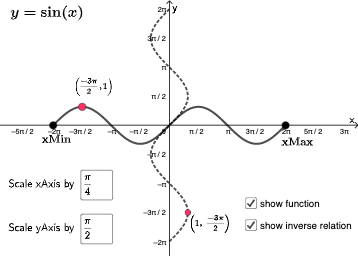
This GeoGebra example demonstrates how to dynamically construct the graphs of the inverse sine (arcsin) and inverse cosine (arccos) functions, with interactive input boxes to adjust parameters and visually explore the relationship between inverse trigonometric functions and their original sine/cosine counterparts. Core mathematical concepts include the domain and range of inverse trigonometric functions, symmetry of function graphs, and the correspondence of angles on the unit circle. The construction uses GeoGebra commands such as If, Point, Numerator, Denominator, SurdText, Textfield, and CurveCartesian, along with objects like k, f, eq1, A, B, a, b, c, d, text3, text1, text4, e, InputBox1, text2, g, C, h, D, p, i, j, InputBox2, text5, l, and m. It is suitable for high school or pre-university students learning trigonometric functions and their inverses, and can be used by teachers for classroom demonstrations or by students for self-directed exploration of inverse trigonometric properties.
GeoGebra Commands & Parameters
If(k ≟ 1, sin(x), k ≟ 2, cos(x), k ≟ 3, tan(x)) → fPoint(f) → ANumerator(a) → cDenominator(a) → dSurdText(b) → text3SurdText(b) → text1Textfield(e) → InputBox1CurveCartesian(f(t), t, t, g, h) → iTextfield(j) → InputBox2
AI Drawing Prompt Reference
Draw the graphs of sine, cosine, and tangent functions, and their inverse functions. Use sliders to adjust parameters, dynamically input function expressions via input boxes, and plot the curves in the coordinate system. Label the domain and range of the inverse functions, display corresponding angles on the unit circle, and highlight key mathematical concepts like symmetry and function relationships using text boxes and symbols.
The prompt above was compiled from the original drawing commands and is for reference only.