
Simple Pendulum and Simple Harmonic Motion (MAS) Animation
Loading the math board and drawing, please wait…
In collections
El dominio del Tiempo (cinemática intuitiva)
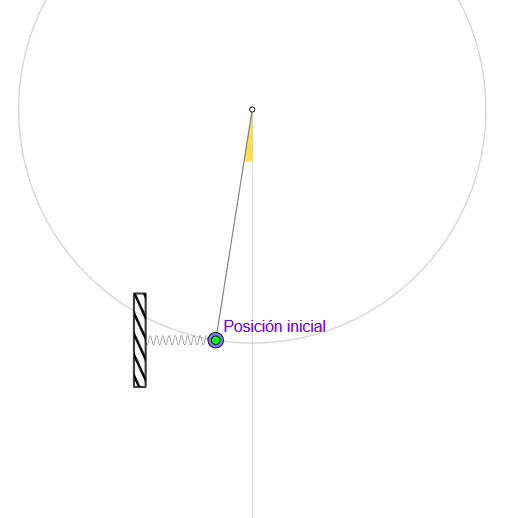
This GeoGebra example visualizes the simple pendulum motion (in the small-angle regime) and compares it with Simple Harmonic Motion (MAS) by linking the pendulum’s displacement to circular motion geometry. It highlights key mathematical ideas such as circle-based projection leading to sinusoidal behavior, the role of angles and trigonometric relationships, mean/sum operations for aggregating parameters or components, and a time-driven periodic model controlled by animation parameters. Construction elements extracted from the command list include: Circle and Arc to build the reference circle and arc, Point/Segment/Line/Ray for defining pivot and link geometry, UnitOrthogonalVector and Angle for establishing orientation and measuring the angular position, If for conditional switching of states, mean and Sum for computed quantities, CurveCartesian for plotted curves, and Mirror (together with lines) for symmetric constructions. Time/animation control objects (e.g., anima, reinicia, t0/t1, osci, T, dt, amp, sum) drive the trajectory so that amplitude and symmetric positions (e.g., “verAmplitud”, “verSimétrico”, velocity/displacement traces) can be observed over a full period. Suitable for secondary school physics/math demonstrations and for introductory modeling and trigonometry instruction.
GeoGebra Commands & Parameters
Circle(O, l) → cArc(c, Point[c, 0.76389], Point[c, 0.25]) → arcPoint(arc) → PPoint(c) → MSegment(O, M) → rUnitOrthogonalVector(r) → nSegment(M + g, M + gt) → sIf(Length[reg] ≟ 1, {reg(1)}, Sequence[reg(k) - reg(k + 1), k, 1, Length[reg] - 1]) → regDifmean(regDif) → TAngle(P, O, (x(O), -100)) → ampSum(Sequence[((((2 * k))! / ((2^((2 * k)) * (k!)^(2))))^(2) * (sin(amp / 2))^((2 * k))), k, 0, 83]) → sumRay(O, O + (0, -1)) → srLine(P, P + (1, 0)) → hMirror(P, sr) → P'Segment(O, P) → rPCurveCartesian(t, y(P0) + (0.1 * sin(((30 * pi) * (t - (x(MM) + 0.5)) / (x(P0) - (x(MM) + 0.5))))), t, x(P0), x(MM)) → muelle
AI Drawing Prompt Reference
Draw a simple harmonic motion animation with a reference circle and arc centered at O with radius 1. Take a point P on the arc, and draw a ray from O to the negative y-axis. Connect OM, and find the unit orthogonal vector n of OM. Draw a line segment s from P that intersects the arc. Calculate the angle amp of P relative to O. Compute the Taylor series sum of amp. Draw a horizontal line h through P and a vertical line sr through O. Mirror P to get P', and connect OP'. Draw a curve muelle to represent the motion trajectory.
The prompt above was compiled from the original drawing commands and is for reference only.