
Power Functions and Geometric Shapes
Loading the math board and drawing, please wait…
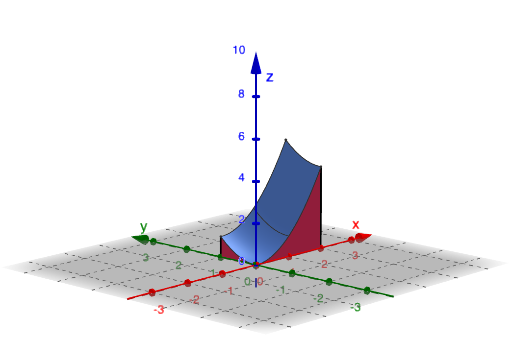
This example demonstrates the geometric shapes and properties of power functions. By inputting different parameters, you can observe the changes in the power function graphs. Key mathematical concepts include power functions, real numbers, and geometric shapes. Various GeoGebra commands such as function, graph, and sequence are used. Suitable for high school mathematics education and learning.
GeoGebra Commands & Parameters
Textfield(ax) → InputBox1Textfield(bx) → InputBox2Textfield(ay) → InputBox3Textfield(by) → InputBox4Textfield(b) → InputBox5Line(A4, xAxis) → iLine(A3, xAxis) → jLine(A2, yAxis) → kLine(A1, yAxis) → lIntersect(i, l) → AIntersect(i, k) → BIntersect(k, j) → CIntersect(l, j) → DPolygon(A, B, C, D) → poly1, s, t, d, eSegment(D', D) → mSegment(C', C) → n1Segment(B, B') → qSegment(A', A) → rFunction(b, ax, bx, ay, by) → oSurface(ax, s, (t * o(ax, s)), s, ay, by, t, 0, 1) → u1Surface(bx, s, (t * o(bx, s)), s, ay, by, t, 0, 1) → u2Surface(s, ay, (t * o(s, ay)), s, ax, bx, t, 0, 1) → u3Surface(s, by, (t * o(s, by)), s, ax, bx, t, 0, 1) → u4Integral(b, y) → uSequence(ay + (i * (by - ay) / n), i, 0, n) → list1, {0, 0.002, 0.004, 0.006, 0.008, 0.01, 0.012, 0.014, 0.016, 0.018000000000000002, 0.02, 0.022, 0.024, 0.026000000000000002, 0.028, 0.03, 0.032, 0.034, 0.036000000000000004, 0.038, 0.04, 0.042, 0.044, 0.046, 0.048, 0.05, 0.052000000000000005, 0.054, 0.056, 0.058, 0.06, 0.062, 0.064, 0.066, 0.068, 0.07, 0.07200000000000001, 0.074, 0.076, 0.078, 0.08, 0.082, 0.084, 0.08600000000000001, 0.088, 0.09, 0.092, 0.094, 0.096, 0.098, 0.1, 0.10200000000000001, 0.10400000000000001, 0.106, 0.108, 0.11, 0.112, 0.114, 0.116, 0.11800000000000001, 0.12, 0.122, 0.124, 0.126, 0.128, 0.13, 0.132, 0.134, 0.136, 0.138, 0.14, 0.14200000000000002, 0.14400000000000002, 0.146, 0.148, 0.15, 0.152, 0.154, 0.156, 0.158, 0.16, 0.162, 0.164, 0.166, 0.168, 0.17, 0.17200000000000001, 0.17400000000000002, 0.176, 0.178, 0.18, 0.182, 0.184, 0.186, 0.188, 0.19, 0.192, 0.194, 0.196, 0.198, 0.2, 0.202, 0.20400000000000001, 0.20600000000000002, 0.20800000000000002, 0.21, 0.212, 0.214, 0.216, 0.218, 0.22, 0.222, 0.224, 0.226, 0.228, 0.23, 0.232, 0.234, 0.23600000000000002, 0.23800000000000002, 0.24, 0.242, 0.244, 0.246, 0.248, 0.25, 0.252, 0.254, 0.256, 0.258, 0.26, 0.262, 0.264, 0.266, 0.268, 0.27, 0.272, 0.274, 0.276, 0.278, 0.28, 0.28200000000000003, 0.28400000000000003, 0.28600000000000003, 0.28800000000000003, 0.29, 0.292, 0.294, 0.296, 0.298, 0.3, 0.302, 0.304, 0.306, 0.308, 0.31, 0.312, 0.314, 0.316, 0.318, 0.32, 0.322, 0.324, 0.326, 0.328, 0.33, 0.332, 0.334, 0.336, 0.338, 0.34, 0.342, 0.34400000000000003, 0.34600000000000003, 0.34800000000000003, 0.35000000000000003, 0.352, 0.354, 0.356, 0.358, 0.36, 0.362, 0.364, 0.366, 0.368, 0.37, 0.372, 0.374, 0.376, 0.378, 0.38, 0.382, 0.384, 0.386, 0.388, 0.39, 0.392, 0.394, 0.396, 0.398, 0.4, 0.402, 0.404, 0.406, 0.40800000000000003, 0.41000000000000003, 0.41200000000000003, 0.41400000000000003, 0.41600000000000004, 0.418, 0.42, 0.422, 0.424, 0.426, 0.428, 0.43, 0.432, 0.434, 0.436, 0.438, 0.44, 0.442, 0.444, 0.446, 0.448, 0.45, 0.452, 0.454, 0.456, 0.458, 0.46, 0.462, 0.464, 0.466, 0.468, 0.47000000000000003, 0.47200000000000003, 0.47400000000000003, 0.47600000000000003, 0.47800000000000004, 0.48, 0.482, 0.484, 0.486, 0.488, 0.49, 0.492, 0.494, 0.496, 0.498, 0.5, 0.502, 0.504, 0.506, 0.508, 0.51, 0.512, 0.514, 0.516, 0.518, 0.52, 0.522, 0.524, 0.526, 0.528, 0.53, 0.532, 0.534, 0.536, 0.538, 0.54, 0.542, 0.544, 0.546, 0.548, 0.55, 0.552, 0.554, 0.556, 0.558, 0.56, 0.562, 0.5640000000000001, 0.5660000000000001, 0.5680000000000001, 0.5700000000000001, 0.5720000000000001, 0.5740000000000001, 0.5760000000000001, 0.578, 0.58, 0.582, 0.584, 0.586, 0.588, 0.59, 0.592, 0.594, 0.596, 0.598, 0.6, 0.602, 0.604, 0.606, 0.608, 0.61, 0.612, 0.614, 0.616, 0.618, 0.62, 0.622, 0.624, 0.626, 0.628, 0.63, 0.632, 0.634, 0.636, 0.638, 0.64, 0.642, 0.644, 0.646, 0.648, 0.65, 0.652, 0.654, 0.656, 0.658, 0.66, 0.662, 0.664, 0.666, 0.668, 0.67, 0.672, 0.674, 0.676, 0.678, 0.68, 0.682, 0.684, 0.686, 0.6880000000000001, 0.6900000000000001, 0.6920000000000001, 0.6940000000000001, 0.6960000000000001, 0.6980000000000001, 0.7000000000000001, 0.7020000000000001, 0.704, 0.706, 0.708, 0.71, 0.712, 0.714, 0.716, 0.718, 0.72, 0.722, 0.724, 0.726, 0.728, 0.73, 0.732, 0.734, 0.736, 0.738, 0.74, 0.742, 0.744, 0.746, 0.748, 0.75, 0.752, 0.754, 0.756, 0.758, 0.76, 0.762, 0.764, 0.766, 0.768, 0.77, 0.772, 0.774, 0.776, 0.778, 0.78, 0.782, 0.784, 0.786, 0.788, 0.79, 0.792, 0.794, 0.796, 0.798, 0.8, 0.802, 0.804, 0.806, 0.808, 0.81, 0.812, 0.8140000000000001, 0.8160000000000001, 0.8180000000000001, 0.8200000000000001, 0.8220000000000001, 0.8240000000000001, 0.8260000000000001, 0.8280000000000001, 0.8300000000000001, 0.8320000000000001, 0.834, 0.836, 0.838, 0.84, 0.842, 0.844, 0.846, 0.848, 0.85, 0.852, 0.854, 0.856, 0.858, 0.86, 0.862, 0.864, 0.866, 0.868, 0.87, 0.872, 0.874, 0.876, 0.878, 0.88, 0.882, 0.884, 0.886, 0.888, 0.89, 0.892, 0.894, 0.896, 0.898, 0.9, 0.902, 0.904, 0.906, 0.908, 0.91, 0.912, 0.914, 0.916, 0.918, 0.92, 0.922, 0.924, 0.926, 0.928, 0.93, 0.932, 0.934, 0.936, 0.9380000000000001, 0.9400000000000001, 0.9420000000000001, 0.9440000000000001, 0.9460000000000001, 0.9480000000000001, 0.9500000000000001, 0.9520000000000001, 0.9540000000000001, 0.9560000000000001, 0.9580000000000001, 0.96, 0.962, 0.964, 0.966, 0.968, 0.97, 0.972, 0.974, 0.976, 0.978, 0.98, 0.982, 0.984, 0.986, 0.988, 0.99, 0.992, 0.994, 0.996, 0.998, 1}Element(list3, faces) → Selectedvector
AI Drawing Prompt Reference
Draw a geometric representation of power functions, showing their shapes and properties. Start by plotting the coordinate axes and marking several key points on them to form a quadrilateral. Then, plot two power function curves based on input parameters and generate their surface plots. Finally, add some contour lines on the surfaces to illustrate the function's variation trends.
The prompt above was compiled from the original drawing commands and is for reference only.