
Positive Curvature: Sphere and Exponential Surface Construction
Loading the math board and drawing, please wait…
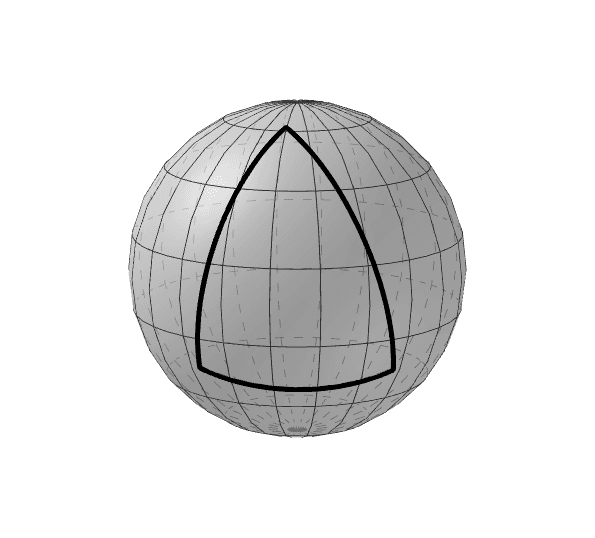
This GeoGebra example illustrates a surface with positive curvature by combining a sphere and exponential functions, demonstrating how curvature remains positive across the surface. The core mathematical concepts involve curvature, spherical geometry, exponential and quadratic functions, as well as intersections, tangents, and derivatives. The construction uses commands such as Intersect to find intersection points between surfaces and curves, Surface to generate 3D surfaces, PointIn to place points on objects, and CircleArc to draw arcs. Key objects include sphere c, point A, intersection i, point B, arc a, points D, C, F, E, and curves d, e, f. This example is ideal for high school and university students learning geometry and calculus, offering a visual and interactive way to understand positive curvature and practice using dynamic 3D geometry tools.
GeoGebra Commands & Parameters
Intersect(yAxis, xAxis) → ASurface((cos(i) * sin(j)), (sin(i) * sin(j)), cos(j), i, 0, (2 * π), j, 0, π) → iPointIn(c) → BCircleArc(A, E, B) → dCircleArc(A, F, E) → eCircleArc(A, F, B) → f
AI Drawing Prompt Reference
Draw a visualization of positive curvature by combining a sphere with a surface generated from cosine, sine, and exponential functions. Show their intersection as a curve. Mark a point on the sphere and draw three arcs from this point to different points on the curve, creating a dynamic geometric structure to illustrate the concept of positive curvature.
The prompt above was compiled from the original drawing commands and is for reference only.