
Polyline Construction and Stochastic Process Visualization
Loading the math board and drawing, please wait…
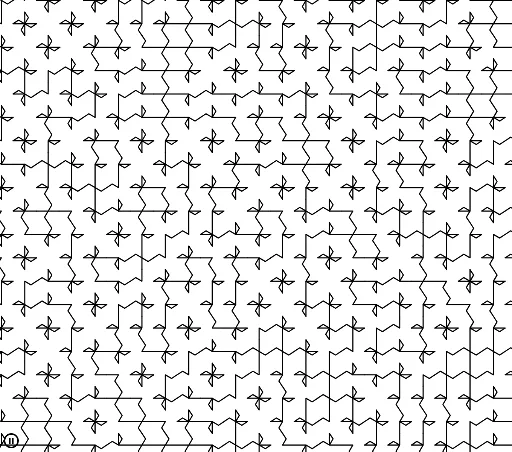
① This GeoGebra example demonstrates the construction of polylines (broken lines) using polygon, midpoint, rotation, and sequence commands, creating a dynamic pattern that can represent a stochastic process or random walk. ② Core mathematical concepts include stochastic processes, orthocenter, prisms, trigonometric functions, means, and power functions, all integrated into the polyline geometry. ③ Construction highlights: commands used are Polygon, Midpoint, PolyLine, Rotate, and Sequence; objects include A, B, poly1, f, g, h, i, C, D, H, G, I, J, F, E, d, c, l1, l2, l3, n; the sequence and rotation generate multiple polylines, producing complex geometric patterns. ④ Suitable for high school to university-level mathematics education, useful for exploring stochastic process visualization, geometric transformations, and function graphing, as well as for mathematical experiments or artistic geometric design.
GeoGebra Commands & Parameters
Polygon(A, B, 4) → poly1, f, g, h, i, C, DMidpoint(i) → HMidpoint(f) → GMidpoint(g) → FMidpoint(h) → EPolyLine(G, A, J, H) → dPolyLine(E, C, I, F) → cRotate({c, d}, RandomElement[l1]) → l2Sequence(Sequence[Translate[Rotate[{c, d}, RandomElement[l1]], (a, b)], a, -48, 48, 4], b, -48, 48, 4) → l3
AI Drawing Prompt Reference
Draw a dynamic polyline pattern based on a square. Start with a square, mark the midpoints of its sides, and connect some midpoints and vertices to form two crossing polylines. Then randomly rotate these polylines as a whole, and repeat them by translating at fixed intervals both horizontally and vertically, generating a large array of polylines with varied rotations, creating a complex geometric texture resembling a stochastic process or random walk.
The prompt above was compiled from the original drawing commands and is for reference only.