
Visual Patterns 85
Loading the math board and drawing, please wait…
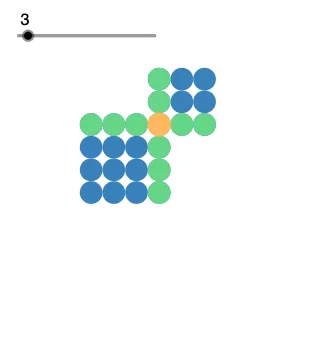
This example demonstrates a dynamic growing geometric pattern, where continuous transformations and combinations form complex designs. Core math concepts include quadratic functions, sequences and series, polygon construction, complex number operations, pie chart/circle chart representation, and sine function applications. The construction leverages GeoGebra commands like Circle, Point, Vector, Sequence, Translate, and Rotate, utilizing objects such as i, n, a, B, A, c, C, v, D, E, w, l3, l1, l5, l6, l2, l4, c', l1', l3', l1'', l3'' for creation. Suitable for high school mathematics education to explore dynamic relationships between functions, sequences, and geometric transformations, enhancing students' ability to visualize mathematical concepts.
GeoGebra Commands & Parameters
Circle(A, B) → cPoint(c) → CVector(C, B) → vPoint(c) → DPoint(c) → EVector(D, E) → wSequence(Translate[c, Vector[((-k) * v)]], k, 1, n + 1) → l3Sequence(Translate[c, Vector[((k - 2) * v)]], k, 1, n) → l1Sequence(Translate[c, Vector[((k - 2) * v)]], k, 1, n) → l5Sequence(Translate[l5, Vector[((-k) * w)]], k, 1, n) → l6Sequence(Translate[l1, Vector[((k - 2) * w)]], k, 1, n) → l2Sequence(Translate[l3, Vector[((-k) * w)]], k, 1, n + 1) → l4Translate(c, Vector[(-v) - w]) → c'Translate(l1, Vector[(-w)]) → l1'Translate(l3, Vector[(-w)]) → l3'Rotate(l1', 90°, (-3, -2)) → l1''Rotate(l3', 90°, (-3, -2)) → l3''
AI Drawing Prompt Reference
Start with a base circle defined by two fixed points. Place three points on its circumference and use them to create two vectors. Translate the circle repeatedly along integer multiples of the first vector to form two parallel rows, one with one more circle than the other. Then translate both rows along integer multiples of the second vector to create a grid of circles. Shift the entire grid by the negative sum of both vectors to make an offset copy. Finally, rotate the offset rows by 90 degrees around a fixed point, interleaving them with the original grid to form a dynamic growing pattern that illustrates sequences and transformations.
The prompt above was compiled from the original drawing commands and is for reference only.