
Fathauer Kites: Colorful Geometric Spiral Construction
Loading the math board and drawing, please wait…
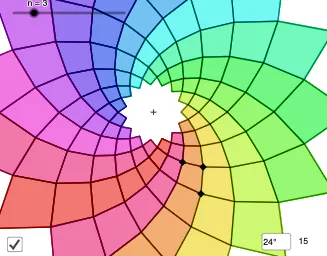
① This example demonstrates a colorful spiral pattern composed of kite-shaped polygons, created through rotations, reflections, and sequences to produce an aesthetically pleasing geometric design. ② Core mathematical concepts include polygons, rotational transformations, mirror symmetry, trigonometric functions (tangent), and centroid/barycenter calculations, along with percentages and statistics for color or size distribution. ③ Construction highlights: using GeoGebra commands such as PointIn, Polygon, Mirror, Segment, Circle, Intersect, Line, Angle, Sequence, Element, and Textfield, with objects like points A, B, C, polygon q1, segments a, c, b, circle f, parameters R and n, mirrored points (B', C'), and auxiliary lines, finally generating a series A1 to A11 via sequence to form the spiral. ④ Suitable for high school to early college students, for exploring geometric transformations, trigonometric applications, and dynamic mathematical art, also serving as a cross-disciplinary teaching resource between math and art.
GeoGebra Commands & Parameters
PointIn(Polygon[A, B, 4]) → CPolygon(A, C, B, Mirror[C, Line[A, B]]) → q1, a, c, b, fMirror(C, Line[A, B]) → C'Segment(A, B) → gCircle(C', g / R) → dCircle(B, c / R) → eIntersect(d, e, 2) → DSegment(C', D) → hMirror(B, h) → B'Polygon(D, B, C', B') → q2, d_1, b_1, c', b'Line(D, C') → iLine(B, A) → jIntersect(i, j) → EAngle(D, E, B) → angSequence(Rotate[Dilate[q1, R^(i), E], (i * ang), E], i, (-n), n) → l1Sequence(Rotate[l1, ((i * 2) * ang), E], i, 0, floor((180°) / ang) - 1) → l2Element(l2, A1) → B1Element(l2, A2) → B2Element(l2, A3) → B3Element(l2, A4) → B4Element(l2, A5) → B5Element(l2, A6) → B6Element(l2, A7) → B7Element(l2, A8) → B8Element(l2, A9) → B9Element(l2, A10) → B10Element(l2, A11) → B11Element(l2, A12) → B12Element(l2, A13) → B13Element(l2, A14) → B14Element(l2, A15) → B15Element(l2, A16) → B16Element(l2, A17) → B17Element(l2, A18) → B18Element(l2, A19) → B19Element(l2, A20) → B20Element(l2, A21) → B21Element(l2, A22) → B22Element(l2, A23) → B23Element(l2, A24) → B24Element(l2, A25) → B25Element(l2, A26) → B26Element(l2, A27) → B27Element(l2, A28) → B28Element(l2, A29) → B29Element(l2, A30) → B30Element(l2, A31) → B31Element(l2, A32) → B32Element(l2, A33) → B33Element(l2, A34) → B34Element(l2, A35) → B35Element(l2, A36) → B36Element(l2, A37) → B37Element(l2, A38) → B38Element(l2, A39) → B39Element(l2, A40) → B40Element(l2, A41) → B41Element(l2, A42) → B42Element(l2, A43) → B43Element(l2, A44) → B44Element(l2, A45) → B45Element(l2, A46) → B46Element(l2, A47) → B47Element(l2, A48) → B48Element(l2, A49) → B49Element(l2, A50) → B50Element(l2, A51) → B51Element(l2, A52) → B52Element(l2, A53) → B53Element(l2, A54) → B54Element(l2, A55) → B55Element(l2, A56) → B56Element(l2, A57) → B57Element(l2, A58) → B58Element(l2, A59) → B59Element(l2, A60) → B60Element(l2, A61) → B61Element(l2, A62) → B62Element(l2, A63) → B63Element(l2, A64) → B64Element(l2, A65) → B65Element(l2, A66) → B66Element(l2, A67) → B67Element(l2, A68) → B68Element(l2, A69) → B69Element(l2, A70) → B70Element(l2, A71) → B71Element(l2, A72) → B72Element(l2, A73) → B73Element(l2, A74) → B74Element(l2, A75) → B75Element(l2, A76) → B76Element(l2, A77) → B77Element(l2, A78) → B78Element(l2, A79) → B79Element(l2, A80) → B80Element(l2, A81) → B81Element(l2, A82) → B82Element(l2, A83) → B83Element(l2, A84) → B84Element(l2, A85) → B85Element(l2, A86) → B86Element(l2, A87) → B87Element(l2, A88) → B88Element(l2, A89) → B89Element(l2, A90) → B90Element(l2, A91) → B91Element(l2, A92) → B92Element(l2, A93) → B93Element(l2, A94) → B94Element(l2, A95) → B95Element(l2, A96) → B96Element(l2, A97) → B97Element(l2, A98) → B98Element(l2, A99) → B99Element(l2, A100) → B100Angle(B, A, C) → αAngle(A, C, B) → βAngle(C', E, C) → γIntersect(Circle[E, C], j) → F, GTextfield(ang2) → InputBox1
AI Drawing Prompt Reference
On a coordinate plane, start with a segment AB and use the line AB as a mirror axis to build a kite-shaped polygon pattern. Define a point C inside a polygon with vertices including A, B and a fourth point, then reflect C across line AB to get C'. Construct circles centered at C' and at B using radii derived from a shared parameter R and intersect them to obtain a point D, then draw segment C'–D. Reflect the segment-related geometry about the line AB to get B', and form a kite polygon with vertices D, B, C', and B'. Finally, treat D and the reference angle from lines involving D, C', and B to iteratively rotate and scale this base polygon around an appropriate center using parameters R and an integer n, producing a spiral-like sequence of repeated kite polygons similar in count and placement to A1 through A11.
The prompt above was compiled from the original drawing commands and is for reference only.