
Polygonal Wheel Bicycle
Loading the math board and drawing, please wait…
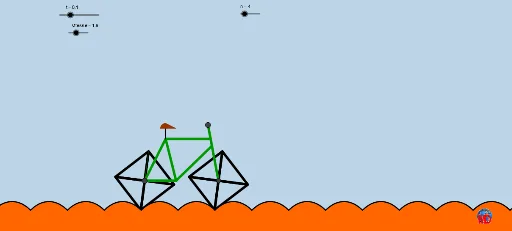
This GeoGebra example dynamically demonstrates the rolling motion of a bicycle with polygonal wheels, revealing uniform motion phenomena with non-circular wheel shapes. Core mathematical concepts include polygonal geometry, trajectory planning, vector transformations, and function sequences. Construction heavily utilizes GeoGebra commands such as If, Function, Sequence, Element, Line, Vector, Translate, Segment, Midpoint, and Polygon, along with objects like points, polygons, and vectors to simulate complex motion. Suitable for high school function and geometry units, or for exploring the motion patterns and curve characteristics of non-circular wheels.
GeoGebra Commands & Parameters
If(Mod[n, 2] ≟ 0, (a * n), (a * n) - 1) → aaFunction(cr - (ir * cosh(x / ir)), (-a), a) → fFunction(cr - (ir * cosh((x - (2 * a)) / ir)), a, (3 * a)) → gFunction(cr - (ir * cosh((x - (4 * a)) / ir)), (3 * a), (5 * a)) → hFunction(cr - (ir * cosh((x - (6 * a)) / ir)), (5 * a), (7 * a)) → pFunction(cr - (ir * cosh((x - (8 * a)) / ir)), (7 * a), (9 * a)) → qFunction(cr - (ir * cosh((x - (10 * a)) / ir)), (9 * a), (11 * a)) → rSequence(((cr * cos(i)), (cr * sin(i)) + cr), i, -3.14 / 2 + 3.14 / n, (3 * 3.14 / 2) + 3.14 / n, (2 * 3.14 / n)) → SSequence((t, 0) + (0, cr) + Rotate[Element[S, i] - (0, cr), ((loop * 2) * 3.14 / n) + atan(sinh((((loop * 2) * a) - t) / ir))], i, 1, n + 1) → PElement(P, 3) → GSequence({Polygon[M, Element[S, i], Element[S, i + 1]]}, i, 1, Length[S] - 1) → L1Sequence({Polygon[H, Element[P, i], Element[P, i + 1]]}, i, 1, Length[P] - 1) → L2Sequence(Segment[Element[P, i], Element[P, i + 1]], i, 1, n) → L3Sequence({Polygon[H, Element[P, i], Element[P, i + 1]]}, i, 1, Length[P] - 1) → Color1Sequence({Polygon[H, Element[P, i], Element[P, i + 1]]}, i, 1, Length[P] - 1) → Color2Sequence({Polygon[H, Element[P, i], Element[P, i + 1]]}, i, 1, Length[P] - 1) → Color3Sequence(Segment[H, Element[P, i]], i, 1, n) → L4Line(H, xAxis) → bSequence(Function[cr - (ir * cosh((x - ((i + 1) * a)) / ir)), (i * a), (i * a)], i, 1, 19, 2) → liste1Function(cr - (ir * cosh((x - (12 * a)) / ir)), (11 * a), (13 * a)) → sFunction(cr - (ir * cosh((x - (14 * a)) / ir)), (13 * a), (15 * a)) → f_1Function(cr - (ir * cosh((x - (16 * a)) / ir)), (15 * a), (17 * a)) → g_1Function(cr - (ir * cosh((x - (18 * a)) / ir)), (17 * a), (19 * a)) → h_1Function(cr - (ir * cosh((x - (20 * a)) / ir)), (19 * a), (21 * a)) → p_1Function(cr - (ir * cosh((x - (22 * a)) / ir)), (21 * a), (23 * a)) → q_1Function(cr - (ir * cosh((x - (24 * a)) / ir)), (23 * a), (25 * a)) → r_1Function(cr - (ir * cosh((x - (26 * a)) / ir)), (25 * a), (27 * a)) → s_1Function(cr - (ir * cosh((x - (28 * a)) / ir)), (27 * a), (29 * a)) → t_1Function(cr - (ir * cosh((x - (30 * a)) / ir)), (29 * a), (31 * a)) → f_2Function(cr - (ir * cosh((x - (32 * a)) / ir)), (31 * a), (33 * a)) → g_2Function(cr - (ir * cosh((x - (34 * a)) / ir)), (33 * a), (35 * a)) → h_2Function(cr - (ir * cosh((x - (36 * a)) / ir)), (35 * a), (37 * a)) → p_2Vector(H, A) → uTranslate(Color3, u) → Color3'Segment(C, A) → eSegment(D, H) → iSegment(H, E) → jSegment(D, E) → kMidpoint(C, A) → FMidpoint(F, C) → IMidpoint(I, F) → JSegment(E, J) → lSegment(D, I) → mSegment(K, D) → a_1Polygon(K, N, O) → poly1, o, k_1, n_1CircleSector(K, O, L) → c_1Point(Color3') → QIntersect(i, j) → RSegment(R, E) → b_1Sequence(Segment[Element[P, i], H], i, 1, Length[P], v) → liste2
AI Drawing Prompt Reference
Draw a bicycle model showing the rolling motion of non-circular wheels. The wheels are composed of multiple polygons, each generated by a cosine hyperbolic function curve. The bicycle frame connects two wheels, and the trajectory of points on the frame forms complex curves as the wheels roll. Display multiple function curves, each corresponding to a wheel's trajectory, connected by segmented functions to form a continuous path. The points on the frame move in sync with the wheel edges, demonstrating the motion characteristics of non-circular wheels.
The prompt above was compiled from the original drawing commands and is for reference only.