
Point Coordinates on a Line: Intersection-Based Construction
Loading the math board and drawing, please wait…
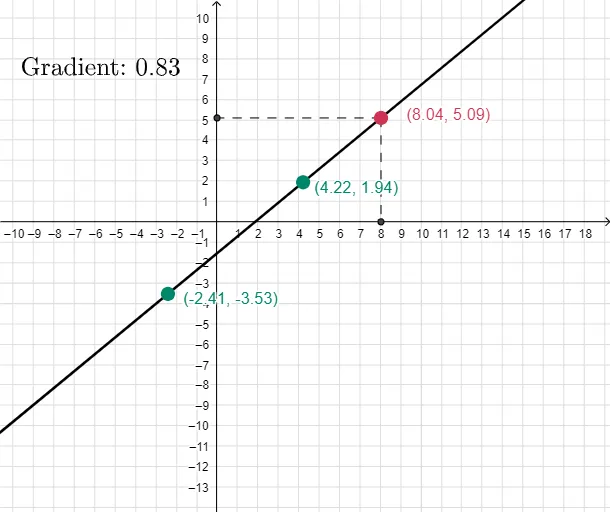
This example demonstrates how to locate and represent the coordinates of multiple points lying on a single line using an intersection-based geometric construction. The key ideas are coordinate geometry (point coordinate representation), the geometric meaning of line relations, and how intersection points turn algebraic location into visible geometric information. Construction essentials: create lines with Line, compute intersection points with Intersect, generate the required Points, and optionally use Segment to illustrate the connecting line pieces. The figure includes several constructed points (e.g., B, C, E, F, H, etc.), line-related labeled objects (e.g., a, b, c, d and their variations), and a displayed label text4 for annotation. Suitable for middle school to early university levels, especially for teaching/learning coordinate placement, geometric construction, and graph-to-coordinate understanding.
GeoGebra Commands & Parameters
Line(B, C) → aIntersect(xAxis, a) → HPoint(a) → ESegment(E, F) → cSegment(E, G) → dPoint(yAxis) → DPoint(xAxis) → A
AI Drawing Prompt Reference
Draw a coordinate plane with the x-axis and y-axis. Choose two points on the plane to define a single straight line passing through them. Construct the intersection point of this line with the x-axis and mark it as a key labeled point. On the same straight line, place another marked point to represent an additional coordinate location. Then draw line segments connecting that second point to two other points shown on the same line to illustrate the related pieces of the construction. Finally, mark the point on the y-axis and the point on the x-axis to emphasize the role of the axes in locating the points.
The prompt above was compiled from the original drawing commands and is for reference only.