
Point, Circle and Sphere Exploration
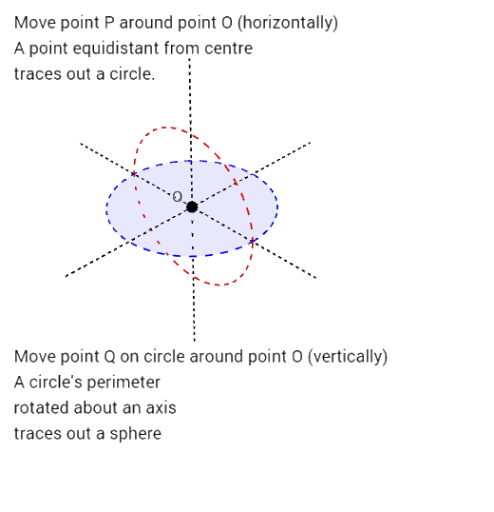
Loading the math board and drawing, please wait…
This example uses geometric exploration to help students intuitively understand the concepts of circles and spheres. It involves key mathematical concepts such as the properties of circles and spheres. Using GeoGebra commands like Point, Circle, Vector, etc., students can dynamically observe and manipulate these geometric objects. Suitable for middle school and above students for self-study or classroom use.
GeoGebra Commands & Parameters
Point(zAxis) → OCircle(O, B, xOyPlane) → cVector((0, 0), (0, 1, 0)) → uCircle(O, B, u) → dPoint(d) → QAngle(B, O, Q) → αLine(C, O) → aRotate(c, (-α), a) → c'Rotate(c, α, a) → c''PathParameter(Q) → bVector(O, Q) → vVector(V, O) → wSegment((-4, 0, 0), (4, 0, 0)) → xaxislineSegment((0, -4, 0), (0, 4, 0)) → yaxislineSegment((0, 0, -4), (0, 0, 4)) → zaxislinePoint(c) → PVector(O, P) → g
AI Drawing Prompt Reference
Draw a geometric figure including points, circles, and spheres to illustrate the properties of circles and spheres. Start by plotting a point on the z-axis, then draw a circle with this point as the center and another point as the radius in the xOy plane. Next, draw a vector along the z-axis and use it as the radius to draw another circle in the xOy plane. Take a point on this circle and calculate the angle between the line connecting this point to the center and the x-axis. Then, rotate the first circle clockwise and counterclockwise by this angle to get two new circles. Finally, draw the three coordinate axes and the line connecting a point on the first circle to its center to show the spatial geometric relationships.
The prompt above was compiled from the original drawing commands and is for reference only.