
Point and Segment: Interactive Geometric Construction
Loading the math board and drawing, please wait…
In collections
barycentric coordinates
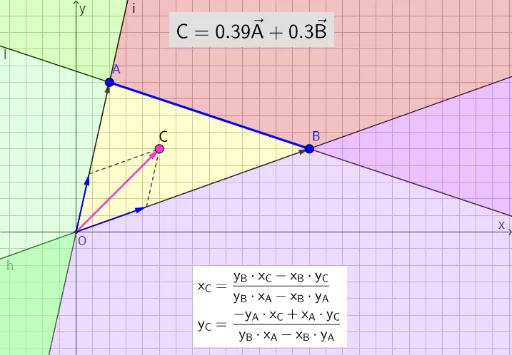
This GeoGebra example demonstrates a dynamic geometric construction involving points, segments, and polygons, illustrating the relationships between points and line segments. Core mathematical concepts include coordinates of points, segment lengths, polygon vertices, intersections, and conditional logic using the If command. The construction uses commands such as Polygon to create a quadrilateral (vierhoek1), PointIn to test point-in-polygon, Line and Segment to draw lines and segments, Vector for vectors, Intersect for finding intersection points, Length for measuring segments, and If for conditional expressions. Objects include multiple points (A, B, C, D, E, F, G, O), segments (a, b, c, d, e, f, g), and text labels (tekst1). This is suitable for middle and high school geometry classes to explore basic properties of points, segments, and polygons, as well as interactive position analysis.
GeoGebra Commands & Parameters
Polygon(D, E, F, G) → vierhoek1, d, e, f_1, g_1PointIn(vierhoek1) → ALine(O, A) → iPointIn(vierhoek1) → BLine(O, B) → hVector(O, A) → uVector(O, B) → vSegment(O, B) → obSegment(O, A) → oaLine(C, i) → gIntersect(g, h) → BBLine(C, h) → fIntersect(f, i) → AAVector(O, BB) → wVector(O, AA) → aSegment(A, B) → abSegment(O, AA) → oaaSegment(O, BB) → obbLength(w) → bIf(xa < 0, "-", "") → tekaIf(xb < 0, "-", "+") → tekbVector(O, C) → cSegment(AA, C) → jSegment(BB, C) → kLine(A, B) → lPolygon(O, B, A) → driehoek1, a_1, o_1, b_1