
Plot Reflection for Any Horizontal or Vertical Line
Loading the math board and drawing, please wait…
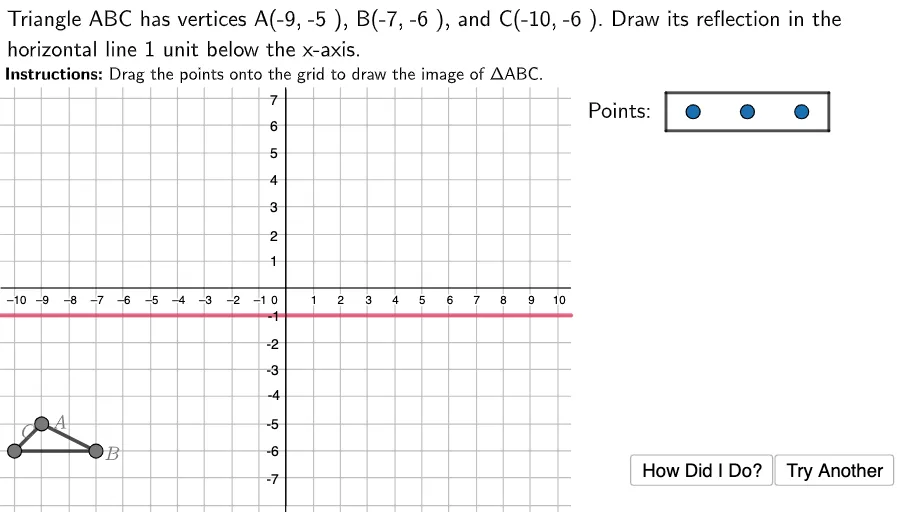
This example demonstrates how to plot the reflection of any horizontal or vertical line. It involves core math concepts like reflection transformation, circumcircle of a circle, difference and slope, tangent function, set theory, tangent line, and geometric constructions. The construction uses commands like Polygon, Join, Point, Textfield, Segment in GeoGebra. Suitable for high school students learning coordinate geometry and transformations.
GeoGebra Commands & Parameters
Polygon((10.5, 9), (25, 9), (25, -10), (10.5, -10)) → RightBox, j, k, l, mPolygon((-12, 7.4), (25, 7.4), (25, 15), (-12, 15)) → TopBox, f, g, h, iJoin({Sequence[Sequence[(i, j), i, -10, 10, 1], j, -10, 10, 1], {(15, 6.5), (17, 6.5), (19, 6.5)}}) → GridSpacePoint(GridSpace) → A1Point(GridSpace) → B1Point(GridSpace) → C1Polygon((14, 7.2), (14, 5.8), (20, 5.8), (20, 7.2)) → PointsBox, n, p, q, rPolygon(A, B, C) → ABC, c, a, bPolygon(A1, B1, C1) → ABC1, c1, a1, b1Polygon(Acorr, Bcorr, Ccorr) → ABCcorr, ccorr, acorr, bcorrTextfield(usertext) → InputBox1Segment(Acorr, (x(Acorr), 0)) → Ahelper1Segment(Bcorr, (x(Bcorr), 0)) → Bhelper1Segment(Ccorr, (x(Ccorr), 0)) → Chelper1Segment(Acorr, (0, y(Acorr))) → Ahelper2Segment(Bcorr, (0, y(Bcorr))) → Bhelper2Segment(Ccorr, (0, y(Ccorr))) → Chelper2Segment(R1, R2) → ReflLineSegment((0, 7.3), (0, -8)) → yaxis
AI Drawing Prompt Reference
Draw a frame consisting of three rectangles, one at the top, one at the bottom, and one in the middle. Inside the middle rectangle, place three points and connect them to form a triangle. Then, plot the horizontal and vertical reflections of this triangle and its three points, ensuring the reflected points are within the frame. Finally, draw lines connecting the midpoints of the reflected and original triangle sides, and lines from the triangle's vertices to the x-axis and y-axis.
The prompt above was compiled from the original drawing commands and is for reference only.