
Plane Regular Polygon in a Sphere
Loading the math board and drawing, please wait…
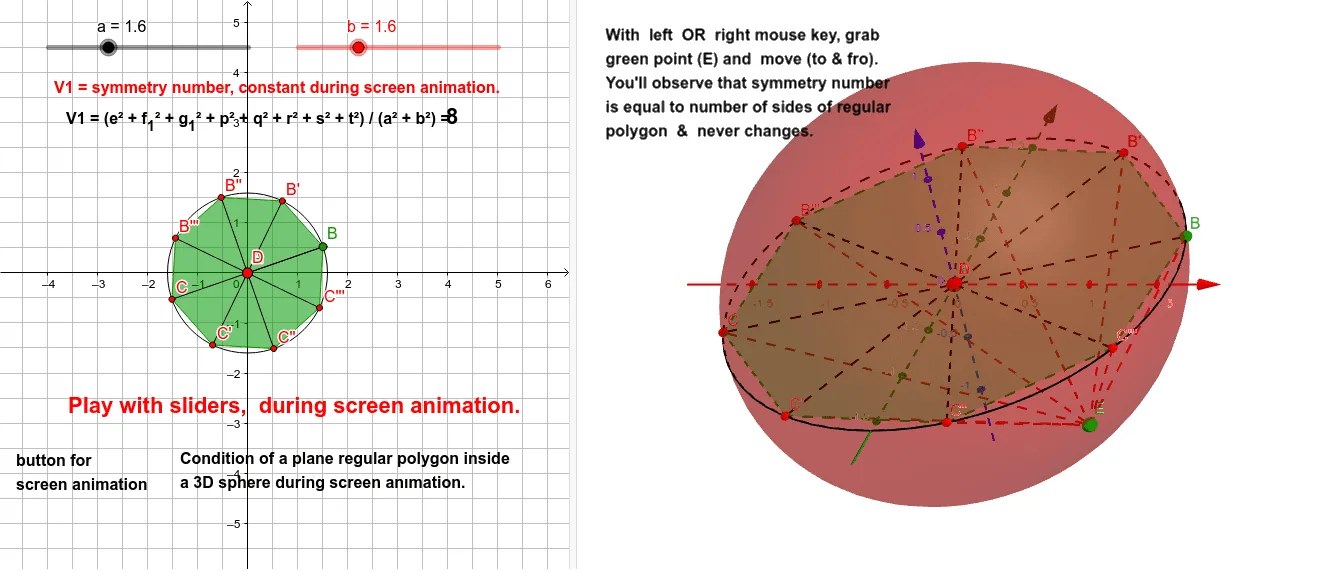
This example demonstrates constructing a regular polygon (e.g., equilateral triangle, square) on a plane inside a sphere, and exploring its rotational symmetry and geometric relationship with the spherical surface. Core mathematical concepts include intersection of a plane and a sphere, rotational symmetry of regular polygons, geometric transformations (rotation, reflection) in 3D space, and the property of a polygon inscribed in a sphere. Construction uses GeoGebra commands such as Circle, Point, Segment, Rotate, Angle, Intersect, Sphere, PointIn, and Polygon. The process involves creating a sphere, defining points on a plane within it, rotating points to generate polygon vertices, and using intersection commands to determine contact points with the sphere. This is suitable for high school or undergraduate solid geometry lessons, helping students visualize how planar figures interact with a sphere in 3D and understand the role of rotational symmetry in geometric construction.
GeoGebra Commands & Parameters
Circle(A, a) → cPoint(c) → BSegment(A, B) → fRotate(B, 45°, A) → B'Angle(B, A, B') → αSegment(A, B') → gRotate(B', 45°, A) → B''Angle(B', A, B'') → βSegment(A, B'') → hRotate(B'', 45°, A) → B'''Angle(B'', A, B''') → γSegment(A, B''') → iRotate(B''', 45°, A) → CAngle(B''', A, C) → δSegment(A, C) → jRotate(C, 45°, A) → C'Angle(C, A, C') → εSegment(A, C') → kRotate(C', 45°, A) → C''Angle(C', A, C'') → ζSegment(A, C'') → lRotate(C'', 45°, A) → C'''Angle(C'', A, C''') → ηSegment(A, C''') → mSegment(A, B) → nIntersect(xAxis, yAxis) → DSphere(A, b) → dPointIn(d) → ESegment(E, B'') → pSegment(E, B''') → qSegment(E, C) → rSegment(E, C') → sSegment(E, C'') → tSegment(E, B') → eSegment(E, B) → f_1Segment(E, C''') → g_1Polygon(B, B', B'', B''', C, C', C'', C''') → poly1, b_1, b', b'', b''', c_1, c', c'', c'''
AI Drawing Prompt Reference
Draw a sphere in 3D space with a plane passing through its center. On this plane, construct a regular octagon centered at the sphere's center. Start with a point on a circle in the plane, then rotate this point around the center by 45-degree increments to generate all eight vertices. Connect consecutive vertices with line segments to form the closed polygon. From the sphere's center, draw line segments to each vertex to show their intersection with the sphere's surface. Additionally, pick an arbitrary point inside the sphere and connect it to all polygon vertices with line segments, illustrating spatial connections between the planar polygon and an interior point. The overall figure emphasizes rotational symmetry and the geometric relationship between the planar shape and the sphere.
The prompt above was compiled from the original drawing commands and is for reference only.