
Phantom Serpentine Graph
Loading the math board and drawing, please wait…
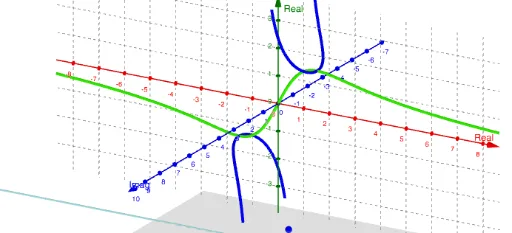
This example demonstrates the construction of a phantom serpentine graph. It involves concepts of trigonometry and complex numbers. Using GeoGebra commands such as Plane, ComplexRoot, InfiniteCylinder, and CurveCartesian, complex geometric shapes can be created. Suitable for high school mathematics education and learning.
GeoGebra Commands & Parameters
Plane((0, c, 0), (1, c, 0), (0, c, 1)) → pComplexRoot((x^(2) * c) + ((a * b) * c) - (a^(2) * x)) → z_1, z_2InfiniteCylinder(yAxis, sqrt((a * b))) → jCurveCartesian(t, a^(2) / ((2 * t)), sqrt((a * b) - t^(2)), t, -100, 100) → eCurveCartesian(t, a^(2) / ((2 * t)), (-sqrt((a * b) - t^(2))), t, -100, 100) → f
AI Drawing Prompt Reference
Create a phantom serpentine graph involving trigonometry and complex numbers, featuring an infinite cylinder along the y-axis and a complex outline composed of two symmetric curves defined as functions of x, showcasing dynamic geometric transformations and symmetry.
The prompt above was compiled from the original drawing commands and is for reference only.