
Perpendicular from an Outer Point: Circle–Line Intersection Construction
Loading the math board and drawing, please wait…
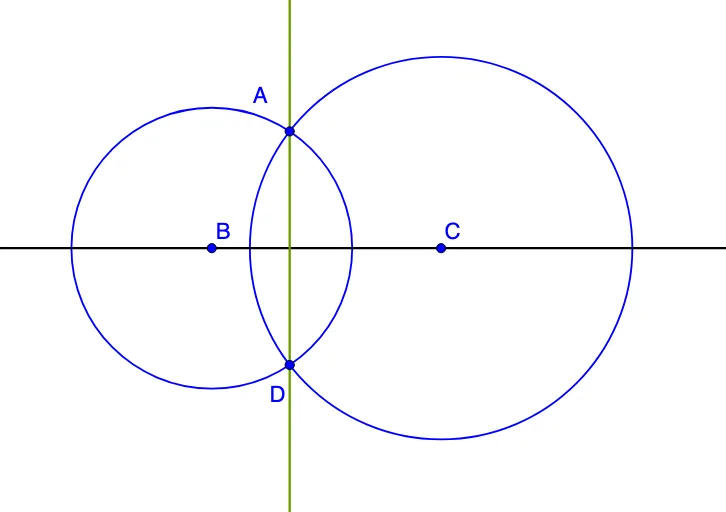
① This GeoGebra exercise demonstrates how to construct a perpendicular from an outer point to a given line/constructed element using a classic circle–intersection method. ② The key ideas are perpendicularity criteria, the equal-distance property of circles, and using intersections of geometric primitives to identify the required points and enforce the right-angle condition. ③ The construction follows the provided command summary: Line to create the necessary lines (objects such as a and c), Circle to draw auxiliary circles (center/points like A, B, C and parameters tied to objects b and d), and Intersect to compute the intersection points (e.g., D and other derived points). These intersection-derived points are then connected to obtain the final perpendicular configuration. ④ Suitable for middle to early high school geometry practice, classroom demonstrations on geometric construction, and students learning proof-by-construction techniques.
GeoGebra Commands & Parameters
Line(B, C) → aCircle(B, A) → cCircle(C, A) → dIntersect(c, d, 2) → DLine(A, D) → b
AI Drawing Prompt Reference
Draw a line and a circle. The circle's center is above a point on the line, and the circle intersects the line at two points. From a point on the line, draw a perpendicular to the line, with the foot of the perpendicular being one of the intersection points. Connect the circle's center to the foot of the perpendicular to get a line that is perpendicular to the original line. The figure includes the line, the circle, and a perpendicular line, illustrating how to find the foot of the perpendicular using circle intersections.
The prompt above was compiled from the original drawing commands and is for reference only.