
Perpendicular from an Inner Point: Construction and Intersection Check
Loading the math board and drawing, please wait…
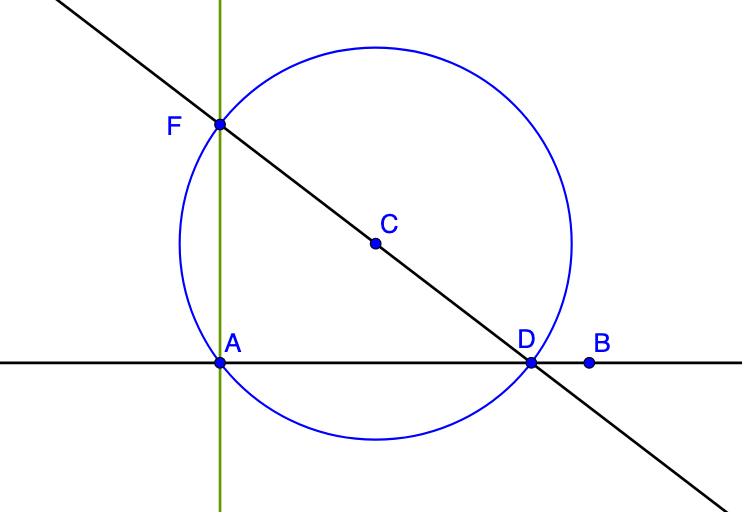
This GeoGebra example demonstrates how to draw a perpendicular from an interior point to a given line and how to locate and verify the foot of the perpendicular using geometric constructions. The main mathematical ideas include perpendicularity (right angles), circle–line intersection, and building geometric constraints step by step. Construction is driven by GeoGebra commands Line, Circle, and Intersect: Line creates the relevant lines (e.g., objects analogous to A, B, a, C), Circle defines auxiliary circles tied to the interior point (objects such as c, d, b), and Intersect computes the key intersection points used to determine the perpendicular foot and related reference points (e.g., objects akin to D_1, D, F_1, F). Suitable for middle/high school geometry practice, especially construction problems, and for classroom demonstration or independent exploration.
GeoGebra Commands & Parameters
Line(A, B) → aCircle(C, A) → cIntersect(c, a) → D_1, DLine(D, C) → bIntersect(c, b) → F_1, FLine(F, A) → d
AI Drawing Prompt Reference
Draw a line a through points A and B, then draw a circle c with center C and radius CA, which intersects line a at points D and D1. Draw another circle b with center D and radius DC, which intersects circle c at points F and F1. Finally, draw a circle d with center F and radius FA.
The prompt above was compiled from the original drawing commands and is for reference only.