
Perpendicular Bisector of a Line Segment (LR7-02-IP1)
Loading the math board and drawing, please wait…
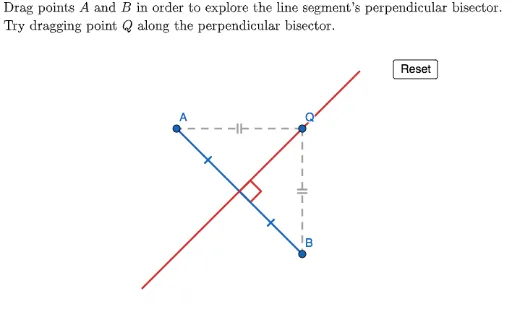
This GeoGebra example demonstrates the construction of the perpendicular bisector of a line segment and verifies its key property: any point on the bisector is equidistant from the segment's endpoints. Core mathematical concepts include the definition and properties of perpendicular bisectors, midpoints, perpendicular lines, and intersections. The construction uses commands such as Polygon, PointIn, Segment, Midpoint, OrthogonalLine, Intersect, Line, Angle, Point, and LaTeX to create the segment AB, its midpoint, the perpendicular line, and a movable point Q to measure distances QA and QB. Suitable for middle school geometry lessons to illustrate the perpendicular bisector theorem and geometric construction techniques.
GeoGebra Commands & Parameters
Polygon({(-8, -8), (-8, 8), (8, 8), (8, -8)}) → innerViewBoxPolygon({(-10, -10), (-10, 10), (10, 10), (10, -10)}) → outerViewBoxPointIn(innerViewBox) → BPointIn(innerViewBox) → ASegment(A, B) → ABMidpoint(AB) → midpointABSegment(A, midpointAB) → AtoMidpointOrthogonalLine(midpointAB, AtoMidpoint) → perpendicularBisectorLineIntersect(perpendicularBisectorLine, outerViewBox) → perpendicularBisector1, perpendicularBisector2Segment(perpendicularBisector1, perpendicularBisector2) → perpendicularBisectorSegment(B, midpointAB) → BtoMidpointLine(A, B) → originalLineAngle(originalLine, perpendicularBisectorLine) → αPoint(perpendicularBisector) → QSegment(Q, A) → QASegment(Q, B) → QBLaTeX("\text{Drag points \(A\) and \(B\) in order to explore the line segment's perpendicular bisector.\\Try dragging point \(Q\) along the perpendicular bisector.}") → TEXT
AI Drawing Prompt Reference
Draw a coordinate plane with two nested square frames. Place two random points inside the inner square and connect them with a segment. Find the midpoint of this segment and draw a line through it perpendicular to the segment, extending to the outer square boundary. Put a movable point on this perpendicular line and connect it to both endpoints of the original segment. Mark the right angle between the perpendicular and the original segment. Add text instructing to drag the endpoints or the point on the perpendicular to explore the property.
The prompt above was compiled from the original drawing commands and is for reference only.