
Perpendicular Bisector Construction
Loading the math board and drawing, please wait…
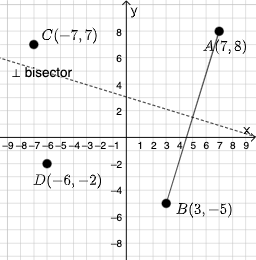
This example demonstrates how to construct the perpendicular bisector of a segment. Key mathematical concepts include line segments, lines, and perpendicular bisectors. It uses GeoGebra commands such as PointIn, Segment, and LineBisector. Suitable for middle school and above students learning geometric construction.
GeoGebra Commands & Parameters
PointIn(e) → APointIn(e) → BSegment(A, B) → fLineBisector(f) → gTextfield(h) → InputBox1Textfield(i) → InputBox2Textfield(j) → InputBox3If(p ≟ g, "√", "X") → text3Mode(l1) → l2If(Length[l2] ≟ 0, "No digits repeat!", "You have repeated digits.") → text4If(Distance[A, C] ≟ Distance[B, C], "√", "X") → text5If(Distance[A, D] ≟ Distance[B, D], "√", "X") → text8
AI Drawing Prompt Reference
Draw a line segment and its perpendicular bisector. The bisector should be perpendicular to the segment and bisect it. Ensure the drawing is clear with the segment and bisector as the main objects.
The prompt above was compiled from the original drawing commands and is for reference only.