
Perimeter of Irregular Shapes by Kong Chan (2)
Loading the math board and drawing, please wait…
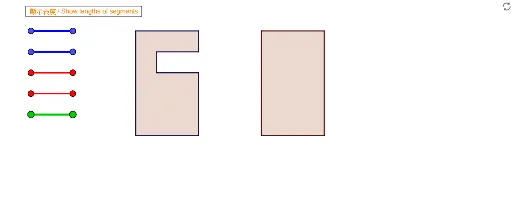
This example demonstrates how to calculate the perimeter of irregular polygons. It involves core math concepts like perimeter, line segments, rhombuses, arithmetic operations, and area. Construction highlights include using Segment and Polygon commands, along with VPoly1 objects and various colors. Suitable for upper elementary or middle school students learning polygon perimeter calculation and geometric construction.
GeoGebra Commands & Parameters
Segment(Blue01a, Blue01b) → Blue01Segment(Blue02a, Blue02b) → Blue02Segment(Blue03a, Blue03b) → Blue03Segment(Blue04a, Blue04b) → Blue04Segment(Red01a, Red01b) → Red01Segment(Red02a, Red02b) → Red02Segment(Red03a, Red03b) → Red03Segment(Red04a, Red04b) → Red04Segment(Blue05a, Blue05b) → Blue05Segment(Red05a, Red05b) → Red05Segment(Blue06a, Blue06b) → Blue06Segment(Red06a, Red06b) → Red06Segment(Blue07a, Blue07b) → Blue07Segment(Blue08a, Blue08b) → Blue08Segment(Blue09a, Blue09b) → Blue09Segment(Blue10a, Blue10b) → Blue10Segment(Blue11a, Blue11b) → Blue11Segment(Blue12a, Blue12b) → Blue12Segment(Red07a, Red07b) → Red07Segment(Red08a, Red08b) → Red08Segment(Red09a, Red09b) → Red09Segment(Red10a, Red10b) → Red10Segment(Red11a, Red11b) → Red11Segment(Red12a, Red12b) → Red12Segment(Green01a, Green01b) → Green01Segment(Green02a, Green02b) → Green02Segment(Green03a, Green03b) → Green03Segment(Green04a, Green04b) → Green04Segment(Green05a, Green05b) → Green05Segment(Green06a, Green06b) → Green06Segment(Green07a, Green07b) → Green07Segment(Green08a, Green08b) → Green08Segment(Green09a, Green09b) → Green09Segment(Green10a, Green10b) → Green10Segment(Green11a, Green11b) → Green11Segment(Green12a, Green12b) → Green12Segment(Green13a, Green13b) → Green13Segment(Green14a, Green14b) → Green14Polygon(VPoly2Fa, VPoly2Fb, VPoly2Fc, VPoly2Fd) → Poly2F, SPoly2Fa, SPoly2Fb, SPoly2Fc, SPoly2FdPolygon(VPoly2Ma, VPoly2Mb, VPoly2Mc, VPoly2Md) → Poly2M, SPoly2Ma, SPoly2Mb, SPoly2Mc, SPoly2MdPolygon(VPoly1Fa, VPoly1Fb, VPoly1Fc, VPoly1Fd, VPoly1Fe, VPoly1Ff, VPoly1Fg, VPoly1Fh) → Poly1F, SPoly1Fa, SPoly1Fb, SPoly1Fc, SPoly1Fd, SPoly1Fe, SPoly1Ff, SPoly1Fg, SPoly1FhPolygon(VPoly1Ma, VPoly1Mb, VPoly1Mc, VPoly1Md, VPoly1Me, VPoly1Mf, VPoly1Mg, VPoly1Mh) → Poly1M, SPoly1Ma, SPoly1Mb, SPoly1Mc, SPoly1Md, SPoly1Me, SPoly1Mf, SPoly1Mg, SPoly1MhSegment(A, B) → L1Segment(C, D) → L2Segment(E, F) → L3Segment(G, H) → L4Segment(I, J) → L5Segment(K, L) → L6Segment(M, N) → L7Segment(O, P) → L8Segment(Q, R) → R1Segment(S, T) → R2Segment(U, V) → R3Segment(W, Z) → R4