
Percent Questions Setup Templates
Loading the math board and drawing, please wait…
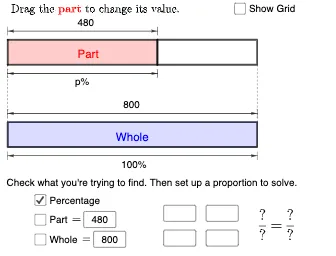
This example demonstrates templates for setting up percent questions in GeoGebra Classroom. Core mathematical concepts include percentages, subtraction, and multiplication. Using GeoGebra commands such as Point, Polygon, Sequence, and Textfield, specific math problems can be constructed. Suitable for middle school and above students to better understand and solve percent-related problems.
GeoGebra Commands & Parameters
Point(yAxis) → APoint(yAxis) → BIf(x(P) ≤ 10, P, (x(P), y(B))) → P0If(x(P) ≤ 10, A + (10, 0), B + (10, 0)) → A0Polygon({P0, A0, A0 + (0, 1), P0 + (0, 1)}) → q2Polygon(P, Q, (0, y(Q)), (0, y(P))) → q1, p_1, q, g, hPolygon({B, B + (10, 0), B + (10, 1), B + (0, 1)}) → q3Polygon({B, B + (10, 0), B + (10, 1), B + (0, 1)}) → q4Sequence(Segment[B + (i, 0), B + (i, 1)], i, 1, 9, 1) → l1Sequence(Sequence[Segment[B + (j + i, 0), B + (j + i, 1)], j, 0, 9, 1], i, 0.1, 0.9, 0.1) → l2Sequence(Segment[A + (i, 0), A + (i, 1)], i, 1, 9, 1) → l3Sequence(Sequence[Segment[A + (j + i, 0), A + (j + i, 1)], j, 0, 9, 1], i, 0.1, 0.9, 0.1) → l4Textfield(n) → InputBox1Textfield(m) → InputBox2If(a, "p", (p * "")) → ptextIf(b, "m", (m * "")) → mtextIf(c, "n", (n * "")) → ntextSegment(A + (0, 1.2), A + (0, 1.5)) → iSegment(P + (0, 1.2), P + (0, 1.5)) → jVector(Midpoint[i], Midpoint[j]) → uVector(Midpoint[j], Midpoint[i]) → vSegment(A - (0, 0.2), A - (0, 0.5)) → kSegment(P - (0, 0.2), P - (0, 0.5)) → lVector(Midpoint[k], Midpoint[l]) → wVector(Midpoint[l], Midpoint[k]) → eSegment(B + (0, 1.2), B + (0, 1.5)) → fSegment(B + (10, 1.2), B + (10, 1.5)) → rVector(Midpoint[f], Midpoint[r]) → sVector(Midpoint[r], Midpoint[f]) → tSegment(B - (0, 0.2), B - (0, 0.5)) → f_1Segment(B + (10, -0.2), B + (10, -0.5)) → g_1Vector(Midpoint[f_1], Midpoint[g_1]) → u_1Vector(Midpoint[g_1], Midpoint[f_1]) → v_1If(a, "p", If[b, "m", "n"]) → text12Sequence(Segment[A + (10 + i, 0), A + (10 + i, 1)], i, 0.1, x(P) - 10, 0.1) → l6Sequence(Segment[A + (10 + i, 0), A + (10 + i, 1)], i, 0, floor(x(P) - 10)) → l5Segment(A, B + (0, 1)) → h_1Segment(If[x(P) ≤ 10, A + (10, 0), P], If[x(P) ≤ 10, B + (10, 1), x(P)]) → i_1Sequence(Segment[A0 + (i, 0), A0 + (i, 1)], i, 0, floor(x(P0) - 10)) → l7Sequence(Segment[A0 + (i, 0), A0 + (i, 1)], i, 0.1, x(P0) - 10, 0.1) → l8Textfield(b_1) → InputBox3Textfield(c_1) → InputBox4Textfield(d_1) → InputBox5Textfield(e_1) → InputBox6Line(C, D) → j_1Point(j_1) → EPoint(j_1) → FPoint(j_1) → GPoint(j_1) → H
AI Drawing Prompt Reference
Create a math model for percent problems, demonstrating percentage, subtraction, and multiplication. Include a coordinate system with points on the y-axis that move based on conditions to form polygons. Use sequences to create multiple horizontal line segments representing different parts. Add text boxes for input values and display calculation results. Construct the base shapes first, then add dynamic elements and text.
The prompt above was compiled from the original drawing commands and is for reference only.