
Pendulum with Unrolled Dial
Loading the math board and drawing, please wait…
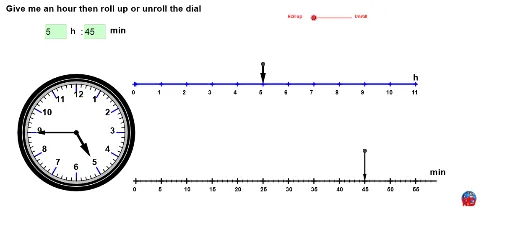
This GeoGebra example demonstrates a pendulum motion while simultaneously displaying the sine and cosine values of the swing angle, along with the pendulum bob's trajectory, on an unrolled dial. The core mathematical concepts involve trigonometric functions (sine and cosine), arithmetic mean, median, and indefinite integrals (used for arc length or area calculations). The construction uses GeoGebra commands such as Circle, Segment, Intersect, Dilate, Sequence, Insert, Element, Rotate, Vector, and Textfield to build the pendulum geometrycars, with multiple lists (list1 to list9) storing values at different times, and a slider θ controlling the swing angle for dynamic updates. It is suitable for high school or early college students to intuitively understand trigonometric functions and periodic motion, and can serve as a visual aid in physics courses for simple harmonic motion.
GeoGebra Commands & Parameters
Circle(C, c) → dSegment(C, D) → d_1Intersect(d, d_1) → E,Dilate(E, 1 / n, C) → D'Sequence(((a * cos((((i * 2) * π / n) * k))) + (b * sin((((i * 2) * π / n) * k))), (-((a * sin((((i * 2) * π / n) * k))) - (b * cos((((i * 2) * π / n) * k)))))), i, 1, n) → list1Sequence(A + Sum[First[list1, i]], i, 1, n, 20) → list2Insert(A, list2, 1) → list3Sequence(Segment[Element[list3, i], Element[list3, i + 1]], i, 1, n) → list4Segment(C, E) → eSequence(Rotate[F, (-i), O], i, 0, 6.283185307179586, 0.5235987755982988) → liste1Sequence(Rotate[F - (0, 0.2), (-i), O], i, 0, 6.28319, 0.5236) → liste2Sequence(Segment[Element[liste1, i], Element[liste2, i]], i, 1, Length[liste1]) → liste3Circle(O, r) → fSegment(C, B) → gSequence(Rotate[F - (0, 0.3), (-i), O], i, 0, 6.28319, 0.5236) → liste2bSequence(Text[i - 1, Element[list3, i + 1] - (0.1, 0.25)], i, 1, Length[list3] - 1) → liste5Sequence(G + Sum[First[list1, i]], i, 1, n, 4) → listeminSequence(Rotate[F - (0, 0.075), (-i), O], i, 0, 6.28319, 0.10472) → liste60Sequence(Rotate[F, (-i), O], i, 0, 6.28319, 0.10472) → liste60aSequence(Segment[Element[liste60a, i], Element[liste60, i]], i, 1, Length[liste60]) → liste6Sequence(Segment[Element[listemin, i], Element[listemin, i + 1]], i, 1, n) → liste8Sequence(G + Sum[First[list1, i]], i, 1, n, 20) → liste9Sequence(Text[i, Element[listemin, i + 1] - (0.071, 0.25)], i, 0, Length[listemin] + 5, 5) → liste7Circle(O, r + 0.1) → hCircle(O, r + 0.035) → pCircle(O, r + 0.175) → qCircle(O, r + 0.225) → sSequence(Text[i, Element[liste2b, i + 1] - (0.065, 0.025)], i, 1, Length[liste2b] - 1) → liste4Element(list2, Length[list2]) → HRotate(F - (0, 0.5), (((-h1) * 2) * π / 12), O) → F'Rotate(F - (0, 0.2), (((-m1) * 2) * π / 60), O) → IVector(O, F') → uVector(O, I) → vElement(list3, Mod[h1, 12] + 2) → JVector(K, J) → wElement(listemin, Mod[m1, 60] + 1) → LVector(M, L) → zElement(listemin, Length[listemin]) → NTextfield(h1) → ChampTexte1Textfield(m1) → ChampTexte2
AI Drawing Prompt Reference
Draw a pendulum with a swinging angle controlled by a slider. Simultaneously display the sine and cosine values of the swing angle on an unrolled dial, and draw the pendulum's trajectory on the dial. The dial should also have hour and minute indicators, as well as areas for numerical displays.
The prompt above was compiled from the original drawing commands and is for reference only.